
Do you have a folder full of images that you need to preview, but don’t want to go through the hassle of opening them one by one? Then you need to give Quick Look in Snow Leopard a try. Quick Look lets you browser files on your Mac without having to open the application for the file. So if you have a QuickTime movie, and Illustrator file, or a Word document you wish to preview you can do so with Quick Look without ever opening the application. The guide below will show you how to use Quick Look to efficiently find files on your Mac.
Software/Hardware used: Mac OS 10.6.
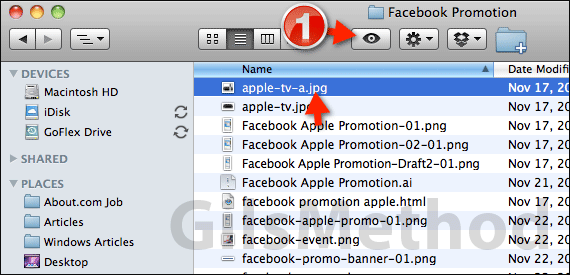
1. Open Finder and locate the folder containing the files you wish to preview. Click the a file from the list and click the Quick Look icon.
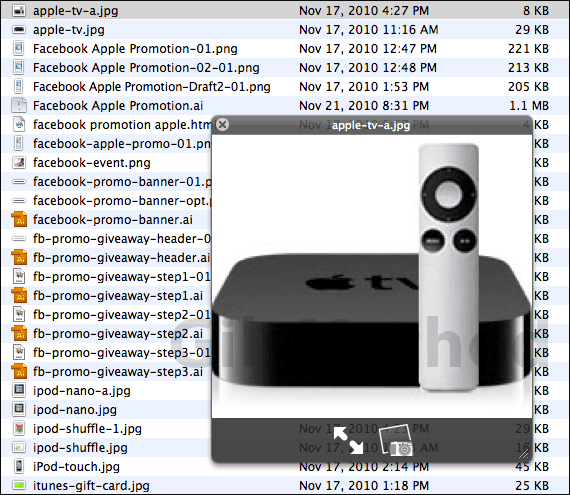
A Quick Look window will immediately open providing you with a preview of the file selected. In the example above I previewed an image file, but as previously stated this feature will work with almost any file format.
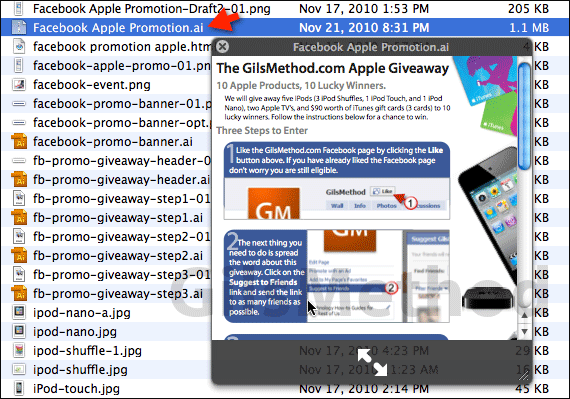
When you click another file from the list a preview will automatically appear. In this case I selected an Adobe Illustrator file that I was able to preview without having to open Illustrator. When you are done using Quick Look simply close the preview window.
You can expand the preview window and in the case of photos and videos add them to the iPhoto and iMovie libraries. If you want to learn more Mac OS tips and tricks make sure to subscribe to our website. If you have any comments or questions please use the comments form below.



