See More About: , , , ,

How to Use Remember the Milk Without a Browser

by

If you are an avid Remember the Milk user, you are going to love this program. If you don’t know what Remember the Milk is, then you’ve been missing out on one of the simplest and most effective task management tools on the web. The App for the Milk program is an Adobe Air application that allows you to manage all of your Remember the Milk (RTM) tasks without having to open a browser window. Not only can you use RTM without a browser, you can also use RTM offline, no need to deal with Gears or other add-ins to enable this functionality on your browser. Did I forget to mention that it is free?

Note: You will need to download and install Adobe Air in order to use this great application. The Adobe Air platform allows programs like these to run on multiple operating systems, so this app will work in Windows, Linux, and Mac OS.

The guide below will walk you thorough some of the features found in the application as well as a quick guide to show you how to use it. If you know of other RTM apps for the computer or have any App for the Milk tips, please post them below.

1. Download and install Adobe Air.

2. Download and install App for the Milk.

appforrememberthemilk thumb How to Use Remember the Milk Without a Browser

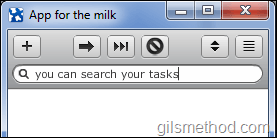
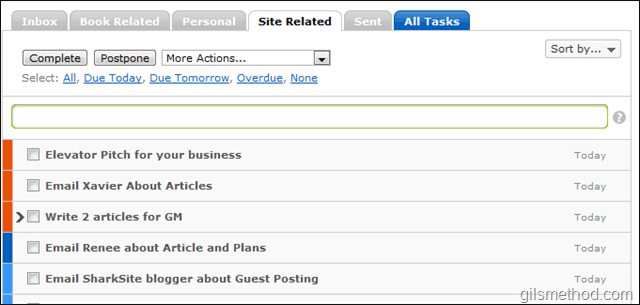
The App for the Milk window. Notice that priorities 1-3 use the same colors in the RTM browser version (picture below).
appforrememberthemilk0 thumb How to Use Remember the Milk Without a Browser

RTM web version.

appforrememberthemilka thumb How to Use Remember the Milk Without a Browser

To search for a task, simply click in the search box and type your query.
appforrememberthemilkb thumb How to Use Remember the Milk Without a Browser

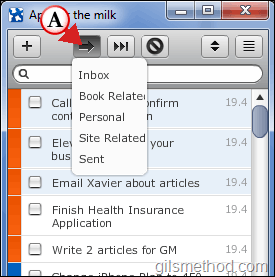
A. If you wish to Move a task to another list, click on the task you wish to move and click on the Move button, this will open a listing of all task lists you use, click to choose the list to move the selected task to.
appforrememberthemilkc thumb How to Use Remember the Milk Without a Browser

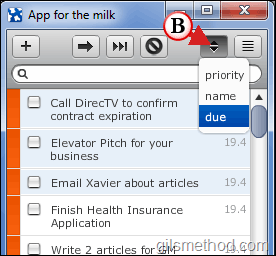
B. To change the method used to sort the list currently displayed, click on the Sort button to choose from the three options provided; Priority, Name, or Due (date).
appforrememberthemilkd thumb How to Use Remember the Milk Without a Browser

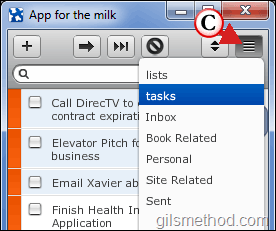
C. To change the list being displayed, click on the View Tasks button to change the list displayed.

appforrememberthemilke thumb How to Use Remember the Milk Without a Browser

If you wish to Postpone a specific task, select the task by clicking on it and click on the Postpone tasks button. To postpone multiple tasks, select multiple tasks by clicking on each one once, then click on the Postpone tasks button.

Create a New Task

To create a new task, follow the instructions below.

appforrememberthemilkf thumb How to Use Remember the Milk Without a Browser

1. Click on the Add Task button (the big + sign).

2. Enter the task you wish to add to the list.

3. Choose the list you wish to assign the task to.

4. Click on the Add button.

If you have any tips, share them below.

See More About: , , , ,
Originally posted Apr 20, 2010

We close comments after 30 days on GilsMethod.com and ask that you post questions and issues on our Answers website.

This helps us better serve you by allowing us to keep track of unanswered questions that are usually hidden in long comment threads.

Answers.GilsMethod.com is a community-powered support website where you will be able to post questions, and other users including us will respond with expert advice.

So if you are having trouble with your PC, Mac, iPad, iPhone, or other piece of technology, head over to Answers.GilsMethod.com and ask away.

  • http://topsy.com/trackback?utm_source=pingback&utm_campaign=L1&url=http://www.gilsmethod.com/how-to-use-remember-the-milk-without-a-browser Tweets that mention How to Use Remember the Milk Without a Browser | GilsMethod.com — Topsy.com

    [...] This post was mentioned on Twitter by Gilberto J Perera. Gilberto J Perera said: Currently reading How to Use Remember the Milk Without a Browser: http://wp.me/pxpvs-Iq [...]

  • http://www.1hfm.com FM health

    Thanks for sharing. I like your post.

  • http://www.1hfm.com FM health

    Thanks for sharing. I like your post.

  • http://www.1hfm.com FM health

    Thanks for sharing. I like your post.

  • http://www.1hfm.com FM health

    Thanks for sharing. I like your post.

  • Dan

    If you’d like a tool for managing your time and projects, you can use this application inspired by David Allen’s GTD:

    http://www.Gtdagenda.com

    You can use it to manage and prioritize your goals, projects and tasks, set next actions and contexts, use checklists, schedules and a calendar.
    Comes with a mobile version too, and with an Android app.