
You’re using Safari to catch up on the latest technology news and find a word you are not familiar with. Immediately you open a tab, head over to dictionary.com or Google to search for a definition, three clicks later you get to the definition. Why waste your time when you can find the definition with one click? Follow the instructions below to learn how to find definitions with one click in Safari.
Software/Hardware used: Safari 5 running Mac OS 10.6.
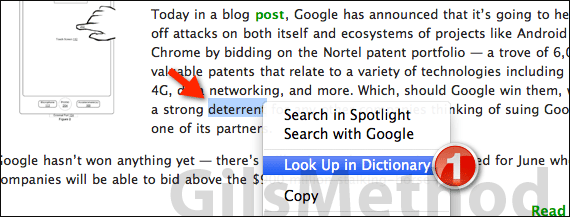
1. In Safari, right-click the word whose definition you wish to find and click Look Up in Dictionary.
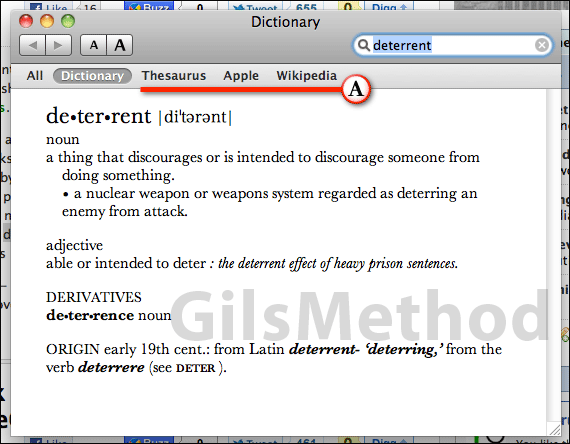
A. Mac OS automatically opens Dictionary and locates the definition for the word you selected.
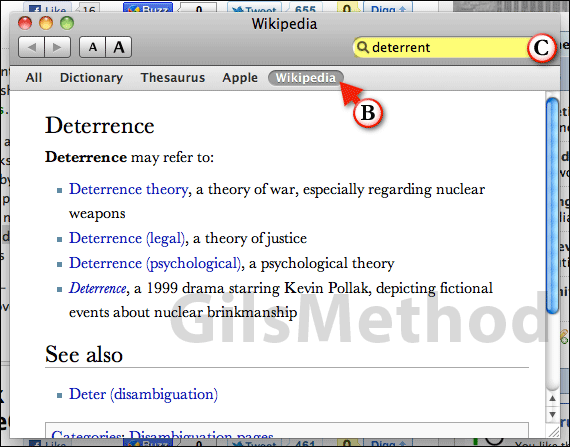
B. If you click on one of the other tabs like Wikipedia, Thesaurus, or Apple you will find additional information about the selected term from the source you chose.
C. With Dictionary open you can search for other terms using the search box.
If you have any comments or questions please use the comments form below.



