
Are you looking for an easy way to download videos from websites like YouTube, Facebook, MySpace, and others?
If so, you have come to the right place. I have put together a list of websites and applications that will allow you to download videos from anywhere on the web in a couple of steps.
Download Videos from the Internet Using These Websites
ClipNabber.com – Nab Your Favorite Videos from the Web
The guide below will show you the steps necessary to download videos from the internet with Clipnabber.com.
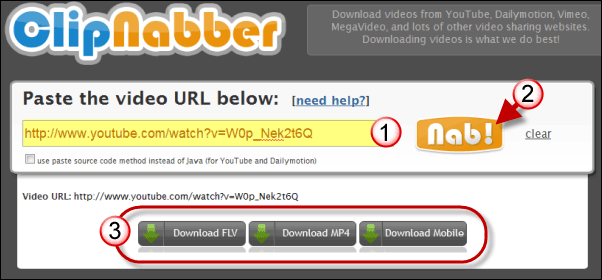
1. Visit ClipNabber.com and paste the web address (URL) to the video you are trying to download.
2. Click on the Nab button.
3. Within a few seconds the download video section will appear. You will have the option to download the video in three formats:
- FLV format for Flash player
- MP4 format that will play in iTunes, Windows Media Player, and other applications.
- Mobile format will allow you to save the file so that it can be played on a mobile device of your choice.
Choose the format that you wish to download.
4. Depending on the browser you are using you may be asked to choose a download location. Take note of it so that you can locate the file once it is downloaded.
That’s it. You just downloaded a video from the internet.
Visit ClipNabber.com.
Zamzar.com – Free Online Video Conversion
Similar to ClipNabber, Zamzar allows you to download videos converted from the site. However in order for you to download the converted video users must enter their email address which is used to send the link to the converted file.
Unlike ClipNabber, Zamzar gives users more flexibility with the formats available for download. Users can download formats ranging from MP4 to WMV file formats.
The short guide below will show you how to convert and download a YouTube video using Zamzar.
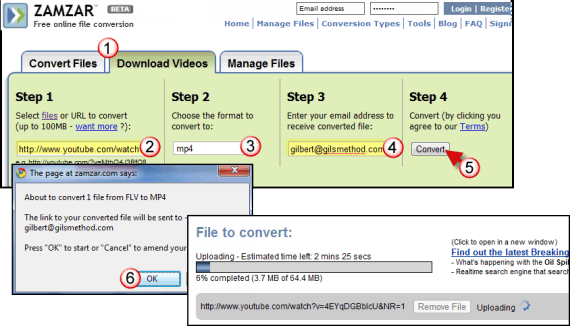
1. Visit Zamzar.com and click on the Download Videos tab.
2. Paste the website address (URL) for the video you are trying to download.
3. Choose the file format used to save the converted video.
4. Enter your email address.
Note: Make sure you provide a valid email address. This is necessary for you to receive the email containing the link to download the video.
5. Click Convert.
6. Click OK when you receive the confirmation dialog box.
Video conversion will begin. Depending on the size of the video and the load on Zamzar’s servers your video should be ready in less than five minutes.
When the conversion is complete you will see a conversion complete message and an email with the download link.
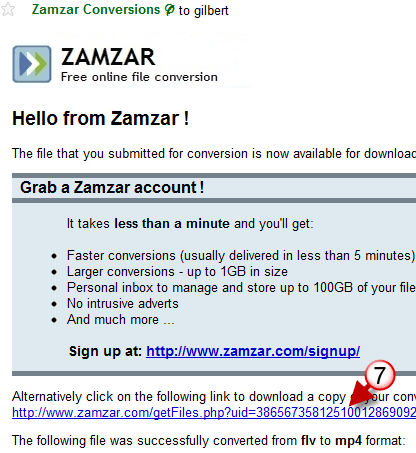
7. Open your email client and locate the email from Zamzar Conversion.
Once you open the message click on the download link to download the video to your computer.
Depending on the email client you are using you may be asked to choose a download location. Take note of it so that you can locate the file once it is downloaded.
Visit Zamzar.com.
The two examples above are methods to download videos using websites that do the conversion for you.
The two examples below are applications you download and install that allow you to do the same without having to rely on a third-party to download the videos you want.
Best of all when you use an application on your computer you will have more control, privacy, and unlimited access to videos you want to download to your computer.
Download Videos from the Web with These Applications
Keep-Tube (Firefox Add-on)
If you are looking for a way to download YouTube videos in an instant and it is fully integrated with YouTube, then you need to download the Keep-Tube add-on for Firefox.
When installed this add-on adds a Download button to all YouTube videos that sits next to other video options. To see how easy it is to download videos using this method check out the two step guide below.
Note: Keep-Tube allows you to download videos from YouTube, Megavideo, Dailymotion, Vimeo, Metacafe, and more.
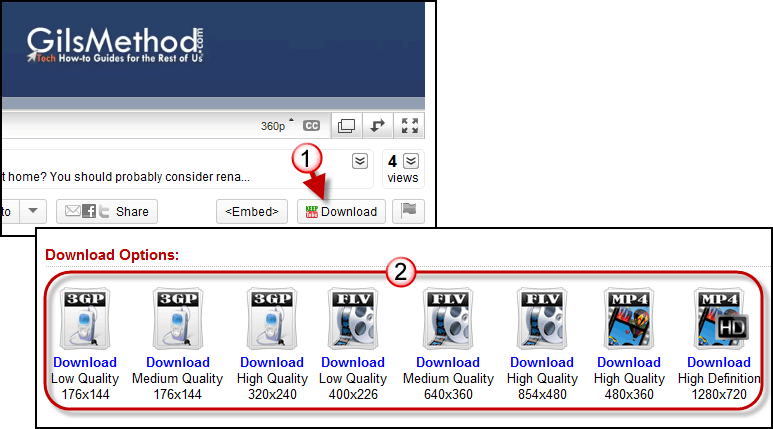
1. Go to YouTube and find the video you want to download. While the video is playing click on the Download button that appears directly below the player controls and next to the <Embed> button.
2. When you click on the Download button the Keep-tube website will open and provide you with several formats and sizes to download the selected video.
Click the format that best suits you and you are set.
You may be asked to choose the save location for the file being downloaded.
Visit the Keep-Tube Add-on Page to download and install this useful add-on.
Video DownloadHelper (Firefox Add-on)
Like Keep-Vid, YouTube Download Helper is a Firefox add-on that allows you to download YouTube videos from the browser. All you have to do is visit the YouTube page with the video you want to download and follow the instructions below.
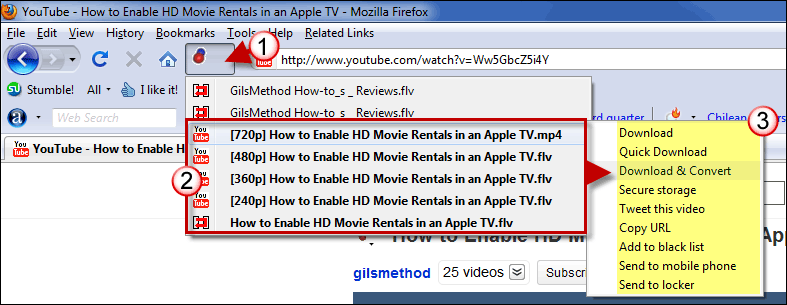
1. Click on the DownloadHelper icon that appears next to the Firefox address bar.
2. Click on one of the download formats available.
3. Click on one of the download options available. Stick to Download and Convert, it’s the easiest.
4. Select the format to convert the file to.
5. Click OK to begin the download.
You will be asked to choose the save location for the file being downloaded, take note of it so that you can locate the file once it has been downloaded.
Visit the Video DownloadHelper Add-on Page to Download and install this Firefox add-on.
Original Article published over three years ago.
 This simple tutorial will show you how to download videos from the internet (MySpace, YouTube, Google Video, etc) and save them to your computer.
The reason you have to through this process to download the videos is due to the fact that content providers use special formats that do not allow playback in traditional media players as such this method allows you to save the video files to a universal .avi video file that you can play back almost anywhere.
As always comments/suggestions are welcome.
1. Download & install Firefox (You need firefox for the extension to work)
2. Download & install the Video Downloader extension for Firefox (The video downloader extension allows you to save videos from popular websites like Myspace, YouTube, Google, and others.)
3. Download & install Media Coder (This encoder converts the video you download into .avi files which allow you to view and store them at your own discretion)
4. Find the video you wish to save. Once you are on the page click the Video Downloader Button in the bottom right part of your Firefox Browser window.
5. A window will pop-up. Click the button that says Download Link
6. When prompted select Save to Disk and then click OK
>>>>>Please note that if the file you download does not have the extension .flv, then rename the file and end the name with .flv <<<<<
7. Start up MediaCoder
8. Click on the I agree radio button and on the Skip Setup Wizard button, then close the window that appears after that.
9. Drag and drop the .flv files you downloaded into the large white area in Media Coder
10. Click on the Video tab in the lower left-hand section on the window and select XviD in the Format drop-down menu.
11. Click the large Start buttonon the top toolbar window to start transcoding your video.
12. When completed a window will propmt you saying that transcoding is completed, go your file’s original location and an .AVI file shoudl be there with the same file name. Now you can play it with Windows Media or your favorite media player.
Note: You should not download/copy/distribute videos which you do not own rights to.



