
Update: Please read the article below as changes were made regarding the value to use when changing registry settings and the applications affected by the change. Thanks to the users that pointed it out!
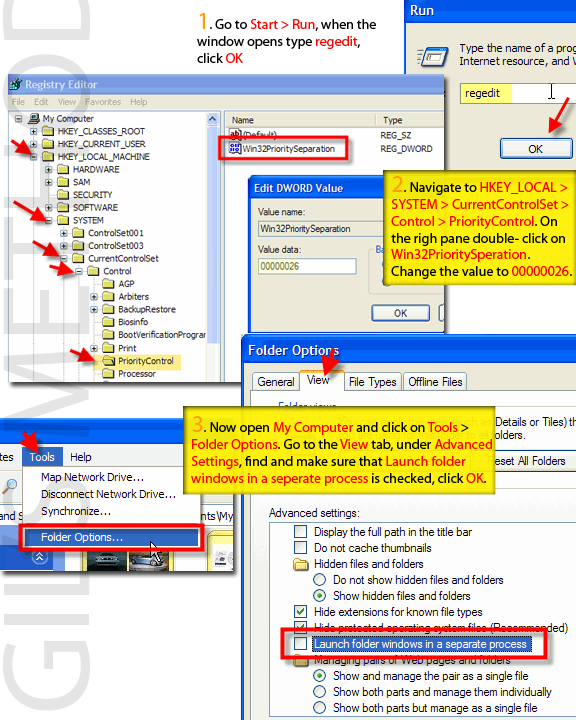 The tweak I am going to describe below increases system stability by instructing the operating system to separate processes for each instance of an application. In other words if you have three Internet Explorer windows open and one of them crashes it will allow you to close out that crashed instance of Internet Explorer without affecting the other two. I consider this to be a life saver because I run multiple instances of Internet Explorer a lot of the time as well as a performance boost that you gain from this tweak. Below you will find the steps necessary to accomplish this. As always comments/suggestions are welcome.
Note: This tweak is only recommended for users with more than 512MB of RAM, the reason for this is the extra use of memory due to separate processes.
1. These tweaks require that you venture into your registry, please backup your registry.
2. Go to Start > Run when the Run box opens type in regedit
3. Your registry should have opened [Just checking…have you backed up your registry?] Navigate to the following keys; HKEY_LOCAL_MACHINE > System > CurrentControlSet > Control > PriorityControl
4. When you get to PriorityControl click on it, the pane to the right should have a listing of several keys, double-click on;
>Win32PrioritySeparation, change it to ‘00000026‘ which is 38 in hexadecimal (changing this optimizes the priority control for processes)
5. Under any explorer window, My Computer, My Documents, etc. Go to Tools > Folder Options
6. A Folder Options dialog box opens, click on the View tab and under Advanced Settings scroll down until you find Launch Folder windows in a separate process.
7. Make sure to check Launch Folder windows in a separate process, click OK
8. Once you’ve changed these settings restart your computer and your settings should have taken effect.
Sources: Kadaitcha, X-setup, Tech Republic


