
This short how-to will walk you through the simple steps necessary to use Microsoft’s BootVis Utility to speed up your computer’s overall boot time. I ran the utility on my Windows XP computer and saw a 40% increase in boot time performance, I went from booting up in 41 seconds to booting up in 25 seconds. Speed improvements vary by machine so don’t be disappointed if you don’t get 30 second boot up times, however if you are able to shave off a couple of seconds off your boot time, is it not worth it?
Before performing the following enhancement, I urge you to reboot your computer several times and collect information on how long each boot up takes. Use those values and calculate a mean/average.
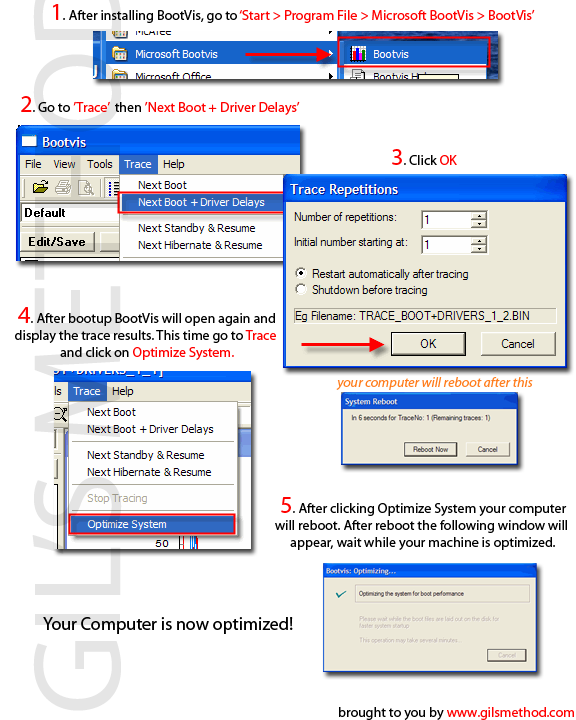
Click on the image below to download the 1 pager guide for the how-to below.
Before proceeding with the tutorial please Download and install BootVis
1. Go to Start > Program Files > Microsoft BootVis > BootVis
2. When the program loads go to Trace > Select Next Boot and Driver Trace
3. When the Trace Repetitions screen appears, click Ok and reboot the machine.
4. After rebooting BootVis will appear, click on Trace > Optimize System
5. Reboot your computer again.
6. Upon rebooting your computer, a screen will appear – Optimizing System box, be patient the operation may take a couple of minutes, when done your computer boot time should have been reduced.
Now that you have optimized your boot up times, it is time to reboot your computer several times and determine the amount of time it takes to boot up, compare the after optimization times with those taken prior to optimization. How did the boot time improve?


