
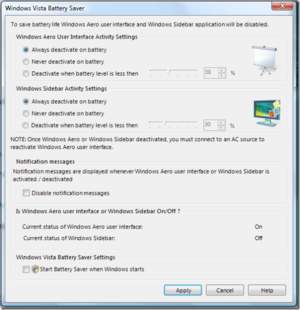
Tamir Khason recently released a neat little application when enabled manages when the Aero effects and the sidebar are activated on your Vista machine. Nick White from Microsoft has admitted to the fact that "…in our testing we’ve seen that turning on Aero consumes only about 1-4% more of battery life."
The program is designed to disable the Aero interface and sidebar from Vista whenever your laptop is running on battery. The programmer was kind enough to allow the user complete and total control as to when that occurs, the user has options to disable Aero and the sidebar only when the battery reaches a certain threshhold or simply when switched to battery power. The program is very straightforward and easy to use.
I’ve been hesitant about posting this program due to the controversy surrounding its effectiveness. The author of the program, Tamir Khason, claims improved battery life as a result of running the program, however Nick White from the Vista development team is not too keen on the statements. Please let me know if some of you actually run tests to determine the programs effectiveness on reducing battery life. If you have any comments/questions let me know.
Software download link below…
Download (beta 1) for free (MSI 901KB). You need Windows Vista Home Premium and notebook to run this program.
Description from Tamir’s Site
It’s not a secret, that cool WDM (Aero user interface), announced in Windows Vista eat laptops’ battery as hungry animal eats it’s victim. But what, actually, "eat" your battery – mostly three things: Aero, Sidebar and your wide laptop screen. We have nothing to do with screen, but we can disable either Aero UI and Sidebar, while working on battery. Let me introduce Vista Battery Saver
Source: Tamir’s Website


