
See More About: , , , ,

Is Your Windows 7 Start Menu Getting Tall? Follow These Steps and Shorten It

by

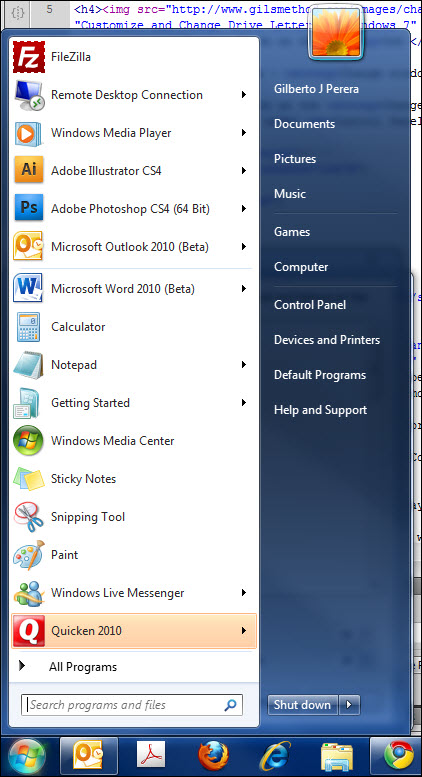
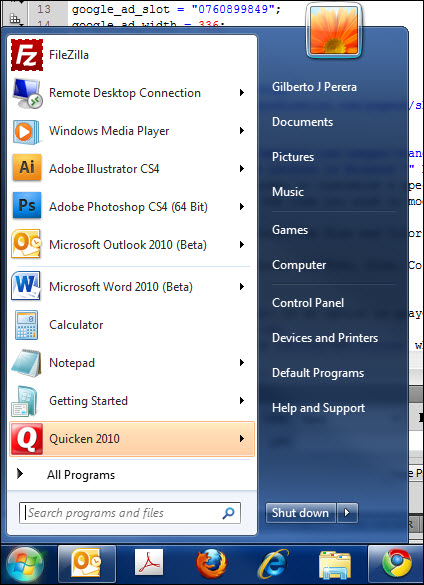
Does your Windows Start Menu resemble a skyscraper in height? By default the Windows 7 Start Menu displays 9 recent applications plus all of the applications that you have pinned up. If you have several pinned up applications like I do, your Start Menu will appear very tall (see screenshot below). In order to remedy this and reduce the number or recent applications to display on the Start Menu, simply follow the instructions below.
change the number of start menu items before Is Your Windows 7 Start Menu Getting Tall? Follow These Steps and Shorten It

The Start Menu with the default number of recent applications.

If you have any comments please post them below or if you have any questions visit our forums.

Note: I used Windows 7 Ultimate in this tutorial.
change the number of start menu items Is Your Windows 7 Start Menu Getting Tall? Follow These Steps and Shorten It

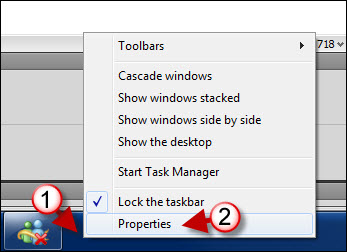
1. Right-click on the Taskbar.

2. Click on Properties from the menu.

change the number of start menu items a Is Your Windows 7 Start Menu Getting Tall? Follow These Steps and Shorten It

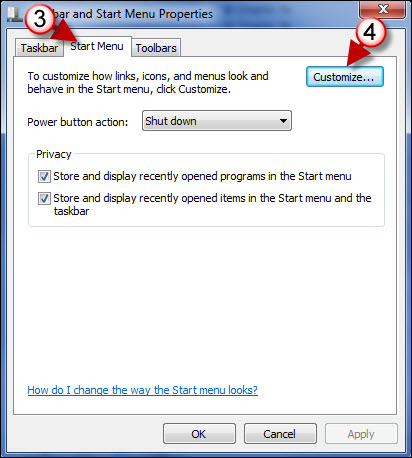
3. When the Taskbar and Start Menu Properties window opens, click on the Start Menu tab.

4. Click on the Customize button.
change the number of start menu items b Is Your Windows 7 Start Menu Getting Tall? Follow These Steps and Shorten It

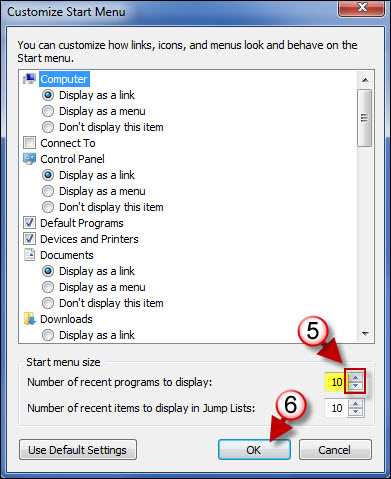
5. When the Customize Start Menu window opens, adjust the Number of recent programs to display by using the down arrow to reduce or the up arrow to increase the number of recent applications to display.

6. Click OK to save the settings.
change the number of start menu items after Is Your Windows 7 Start Menu Getting Tall? Follow These Steps and Shorten It

The Start Menu after the number of the recent items was reduced.

Originally posted Mar 25, 2010

We close comments after 30 days on GilsMethod.com and ask that you post questions and issues on our Answers website.

This helps us better serve you by allowing us to keep track of unanswered questions that are usually hidden in long comment threads.

Answers.GilsMethod.com is a community-powered support website where you will be able to post questions, and other users including us will respond with expert advice.

So if you are having trouble with your PC, Mac, iPad, iPhone, or other piece of technology, head over to Answers.GilsMethod.com and ask away.

  • http://www.pcsfixer.com Computer Dave

    Gee and I thought it was just me who thought that the height was a bit out of control. Thanks for the tips. I’ll definitely put them to us.

  • http://www.pcsfixer.com Computer Dave

    Gee and I thought it was just me who thought that the height was a bit out of control. Thanks for the tips. I’ll definitely put them to us.
