
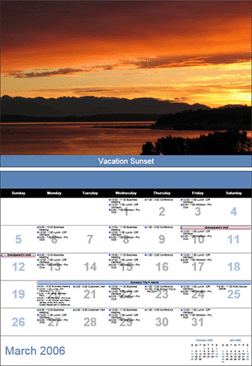
Microsoft just released a nifty add-on for Outlook 2007 users. The new Calendar Printing Assistant for Outlook 2007 add-on, allows Outlook users to print different calendar styles previously unavailable in default Outlook installations.
The program expands on Outlook’s current styles offered by allowing the user to design the calendar, add pictures, and expand on the options available to display your calendar information. For those of you who use the Franklin Covey Planning system, there are several templates which resemble the look and feel of the Franklin Covey planner, so I strongly urge you to look over these templates if you’re willing to switch from the Franklin Covey software to the Outlook software.
From Microsoft Website
You can print and compare calendars in a variety of views:
- Calendars for any time frame. Use day, week, month, and year templates to print your calendar data. Apply the template you want depending on your needs, whether that means keeping current from day to day or making long-term plans.
- Print multiple calendars in one view. The Calendar Printing Assistant gives you the flexibility to print multiple Office Outlook 2007 calendars in either overlay or side-by-side views. These views can help you easily compare your calendar to the calendar of a coworker or a team.
- Ensure professional quality. The Calendar Printing Assistant can help you produce and print designer-quality Office Outlook 2007 calendars simply, without special experience or complicated tools.
Download link below
Download Add-on from Microsoft Website
Description from Microsft website:
The Calendar Printing Assistant for Outlook 2007 is a program that provides an easy way to print and customize Outlook 2007 calendar information. It puts you in control of the tools you need and helps you plan and create designer-quality output.
With this download you can:
- Print dynamic calendar views
- Customize and personalize your calendars
- Adjust information to changing views
Source: Microsoft Website


