
How many times have you put your computer to Sleep only to find that you have waken it by inadvertently hitting the mouse? There’s an option in Windows 7 that will prevent your mouse from waking your computer. The how-to below will walk you through the simple steps of disabling this sometimes annoying setting.
If you need any help, feel free to visit the forum for help or if you have any comments please post them below.
Note: I used Windows 7 Ultimate in this tutorial and a Microsoft Wireless Mouse 5000.

1. Click on the Orb to open the Start Menu.
2. Type mouse into the Search Box.
3. Click on the Mouse shortcut under the Control Panel heading in the search results.
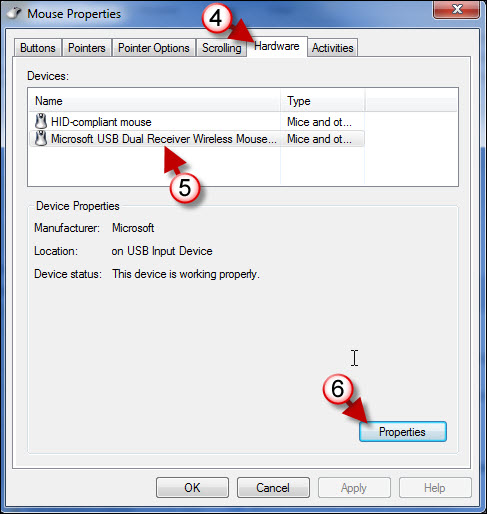
4. When the Mouse Properties window opens, click on the Hardware tab.
5. Click on the mouse you wish to configure.
6. Click on the Properties button.
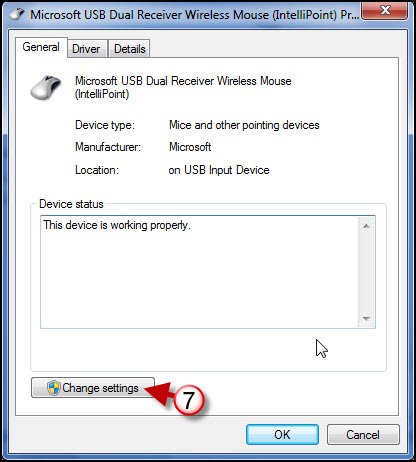
7. When the Properties window for the mouse you chose opens, click on the Change Settings button.
Note: You may get a prompt from User Account Control about proceeding, click Yes or Continue to proceed.
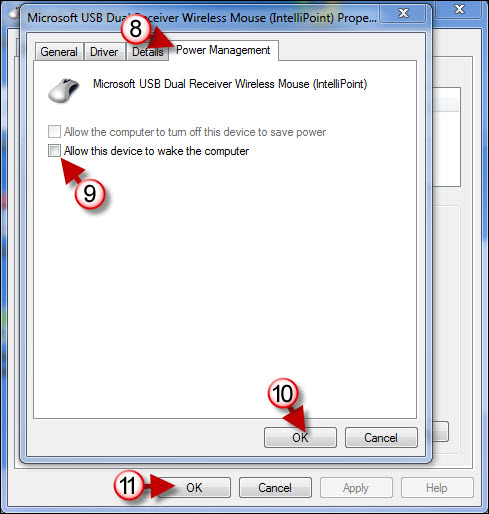
8. When the Settings window opens click Power Management tab.
9. Uncheck Allow this device to wake the computer.
10. Click OK to save the settings.
11. Click OK again to close the window.



