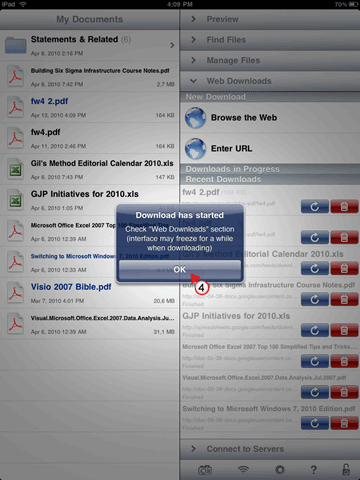
I recently published a somewhat cumbersome how-to that will help you download PDF’s from the internet without realizing that there is an easier way. When installed, GoodReader will automatically download a PDF from Safari when you insert a g in the address field in Safari. Follow the instructions below so that you too can quickly download PDF’s from the internet to your iPad.
Do you know of other ways to download PDF’s from the web to your iPad? Please share them below.
Do you own an iPad? You might want to look into protecting your investment with invisibleSHIELD screen protectors. If you need any help or have questions please post them below.
If you are looking for more iPad how-to’s, tips, and help visit our iPad page.
Before you begin, locate the PDF you wish to download to your iPad and open it in Safari.
(click on the images to enlarge)
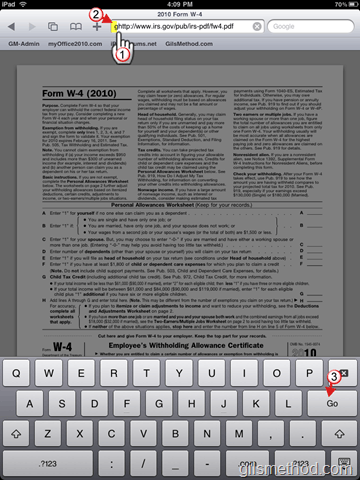
1.Tap and hold until the cursor is located at the beginning of the web address in Safari.
2.Type the letter g, so if the web address is http://www… it should be ghttp://www…
3. Tap Go on the on-screen keyboard.
Safari will Close and GoodReader will automatically open.
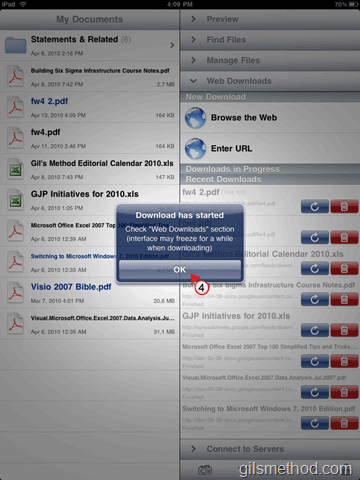
4. The prompt will notify you that the download has started, tap OK to continue.
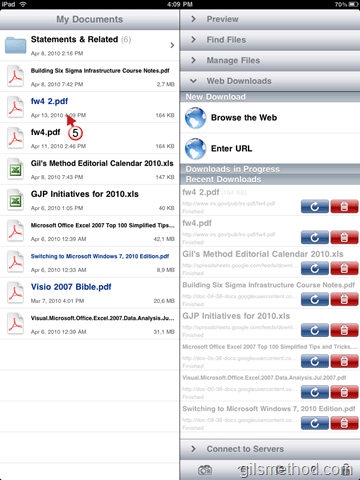
5. Tap on the file you just downloaded to open.
This should work for all files supported by GoodReader as long as you have the files direct URL/address.
File types supported by GoodReader: