
Quick Tabs or as I like to call it, Quick “Peek” allows Internet Explorer 9 users to take a peek of all open tabs in a browser window. This is a great way to quickly close unwanted tabs or to flip through them if you’re feeling a little lost. However if you wish to use this really cool feature you will need to follow the instructions below to enable it, because it appears that Internet Explorer 9 will ship with the feature disabled.
If you have any comments or questions please use the comments form below.
Software/Hardware used: Internet Explorer 9 RC running on Windows 7 Ultimate.
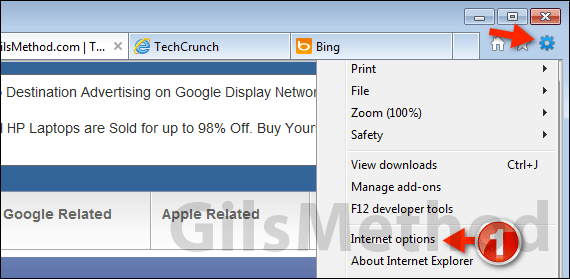
1. Click the Tools icon and then Internet options from the menu.
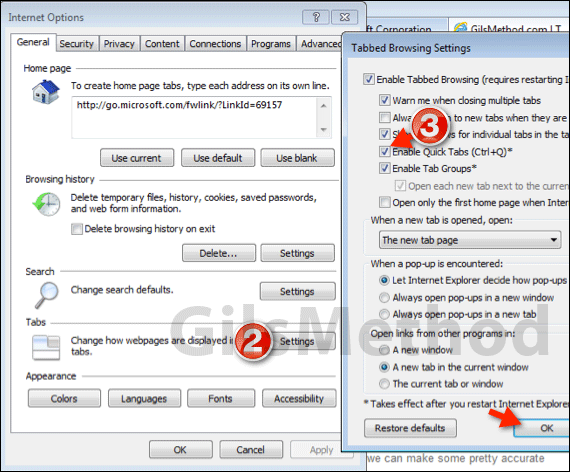
2. When the Internet Options window opens, click Settings in the Tabs section.
3. The Tabbed Browsing Settings window will open. Check Enable Quick Tabs (Ctrl+Q) and click OK. Click OK again to close the Internet Options window.
Close Internet Explorer and reopen.
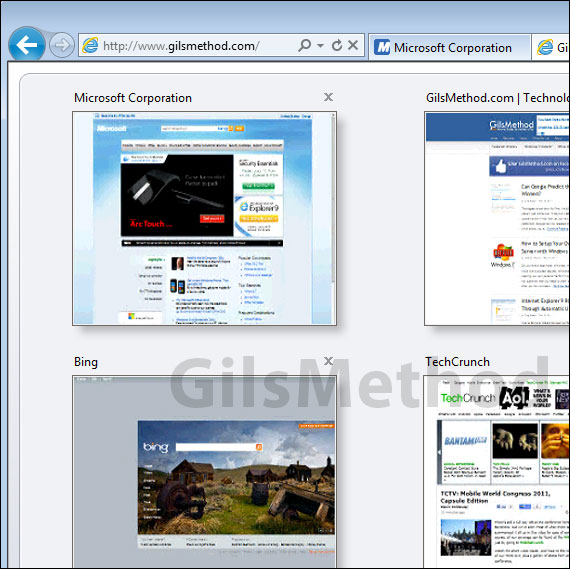
Next time you have several tabs open, press Ctrl + Q on your keyboard and you will get a peek of all open tabs in one view (see above). If you have any other IE9 tips to share please use the comments form below.



