
There are several ways in which your computer’s performance can be improved. A number of them involve easy tweaks, while others involve a little more effort from the user. I will cover all the diferent methods of optimization based on level of ease. Hopefuly once you have completed all the steps listed below you will reap the benefits of a faster and healthier computer. Read on!
1. Turn off Performance Monitor, gain resources.
Windows 2000 and Windows XP have a built-in performance monitor that essentially monitor performance on your machine. This little tool is never used by most users and therefore remains in the background using valuable system resources. To disable follow the steps below.
To view guide click on 
2. XP’s search sucks! Disable the indexing service and save resources.
Your computer ships with an indexing service that keeps track of all the files on your system, this in turn makes searches a lot easier. The problem is that the built in search function in Windows XP is not the most efficient, so if you really want that service you can install Yahoo! Desktop search, Google Desktop, or MSN Desktop. In the meantime XP’s indexing services is hogging your computers valuable resources, so the best option is to disable it and gain those precious resources. Follow the steps in this tutorial to disable the Windows XP indexing service.
To view guide click on 
3. Browse at lightning speeds!
Your computer has the ability of being tweaked to increase performance while browsing. This is often achieved bu the use of thrid-party applications that cache websites, which in trun can take up space, another method used involves manually tweaking the registry which to most is a dreaded task (a mishap can cost you your current installations’ stability). I found a very safe and useful application that edits the registry and other settings without allowing the user to mess it up. Speed Guide’s TCP Optimizer does just that, the small program requires no install, so nothing is added to your machine, you simply run it and adjust it so that it can optimize your browsing experience. Follow the steps in this tutorial to speed up your browsing.
To view guide click on 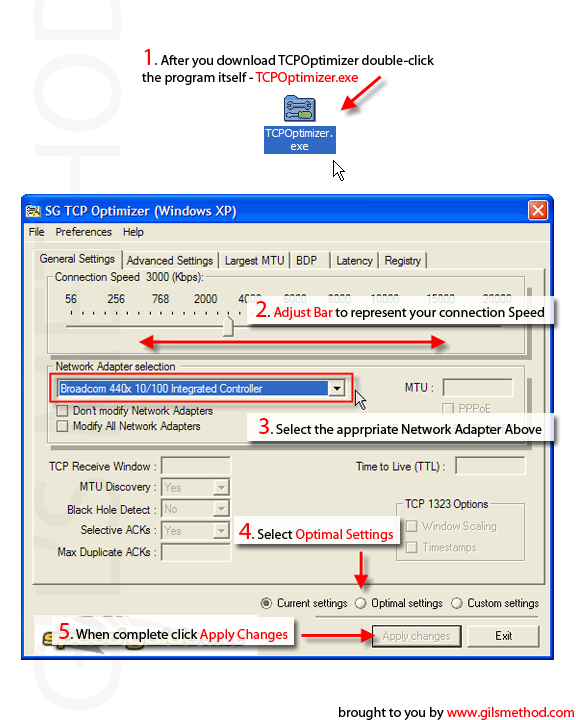
4. Speed up Folder Browsing!
This step-by-step visual guide will show you how to disable the sometimes annoying Windows XP feature that automatically adds network folders & printers which you may already have installed on your system. Doing this will prevent the computer from having printers that are no longer on the network to stop appearing as well as preventing the same printer listed twice. This feature is enabled by default. Your computer will periodically scan other computers on the network and automatically lists their shared resources on your computer. The problem arises when you already have that resource setup manually and it lists that resource again. This can lead to confusion, so if you wish to avoid that confusion, while speeding up browsing time, follow the steps in this tutorial.
To view guide click on 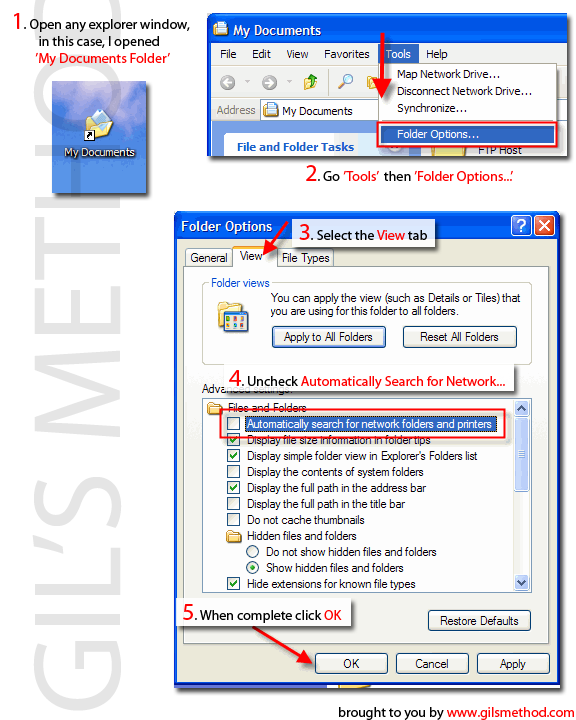
5. Get that computer started faster!
This short guide will show you how to use Microsoft’s BootVis Utility to speed up your computers overall boot time. I ran it on my Windows XP desktop and saw a 40% increase in boot time, I went from booting in 41 seconds to booting in 25 seconds. Speed enhancements vary by machine so don’t be disappointed if you dont get 30 second boot times, but if you can shave a couple of seconds off your boot time, it’s worth the 5 minutes it takes to complete the tutorial.
To view guide click on 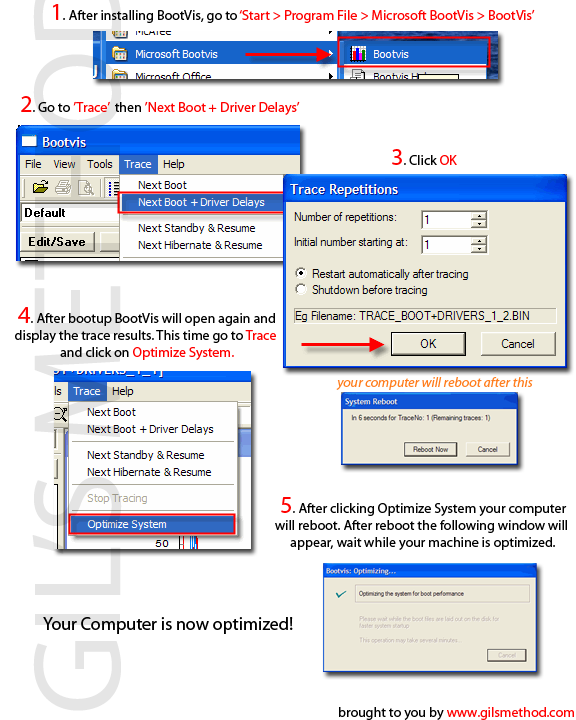
6. DMA your Hard Drive for Better Performance.
It’s amazing how many computers I’ve used that do not have DMA enabled.
“DMA (also referred to as bus mastering) is a technique that some components and devices use to transfer data directly to and from memory without passing through the Central Processing Unit (CPU). DMA reduces CPU overhead by providing a mechanism for data transfers that do not require monitoring by the CPU. The number associated with DMA indicates the direct memory access channel that the component or device uses to transfer data to and from memory.”
In other words it keeps your CPU from getting caught up with other processes that would otherwise tale up resources, thus improving your computers speed.
To view guide click on 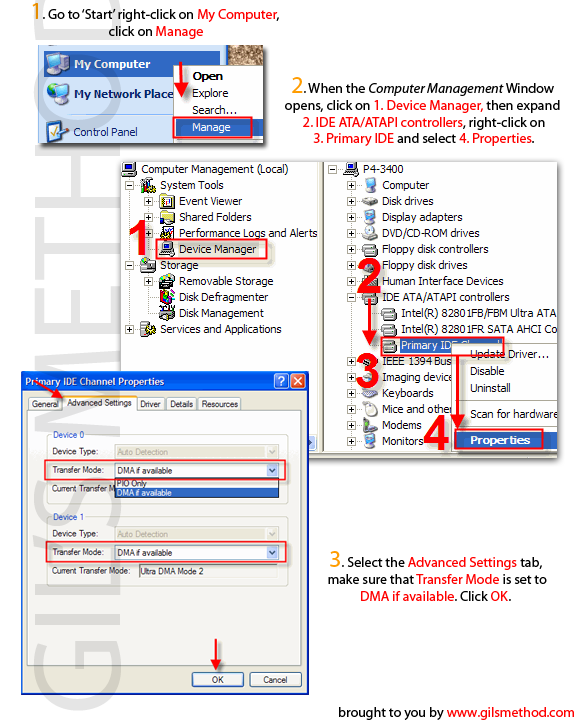
DMA Definition via Microsofts Website.
7. If you’ve got the RAM, use it!
This optimization tweak forces your computer to use as much RAM as it can before it switches to the slower swap file which resides on your hard drive. I only recommend this tweak for computers that have 256MB of RAM or more.
“Swap file: On a hard disk, a file used to store parts of running programs that have been swapped out of memory temporarily to make room for other running programs. It may be permanent, always occupying the same amount of hard disk space even though the application that created it may not be running, or is temporary, and only created as and when needed.*”
To view guide click on 


