If you use Windows 7 on your PC and happen to use iTunes to manage your videos, music, and other digital content, you are going to love this tip. One of the features introduced in the Windows 7 Taskbar is the ability to Pin items to the Taskbar. Aside from pinning items to the Taskbar, developers can now add common tasks and options to jump lists on the Taskbar. The latest version of iTunes takes advantage of these features and allows you to perform several tasks without having to open the iTunes window.
Note: I used iTunes 9.1.1 and Windows 7 Ultimate for this tutorial.
Please reference the screenshot below as I go over some of these features.
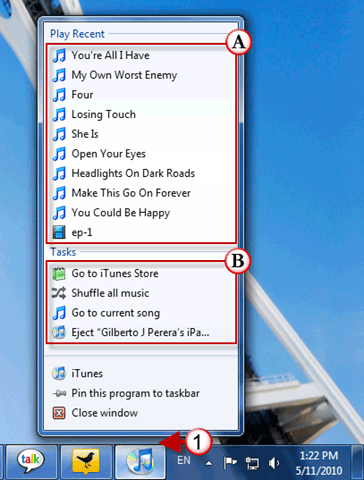
1. Right click on the iTunes icon in the Windows Taskbar.
When the menu appears you will notice that there are two sections.
A. Play Recent – In this list you will find the music/videos you’ve listened to/watched recently.
B. Tasks:
- Go to iTunes Store.
- Shuffle all music.
- Go to current song (only if you’re listening to a song).
- Eject “device†(if your iPod/iPad/iPhone is attached).
You can also use the iTunes thumbnail that appears when the pointer hovers over the iTunes icon to control the playback of music in iTunes.
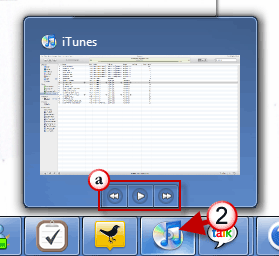
2. Place your mouse pointer over the iTunes icon in the Taskbar.
a. Use the playback buttons to control the music playing.
If you have any iTunes or Windows 7 tips to share, please post them below and share with others.