
Wouldn’t it be nice to be able to quickly translate an entire document into your native tongue? In Word 2010 you will be able to do just that. One of the most recent features added to the Office suite is the ability to translate words, sentences, or entire documents without having to leave the Word document window.
Once configured correctly, Word 2010 will provide you with the option to translate to and from a list of over dozen languages, all with a click of a button. Word automatically determines the language of the text and only asks that you choose the language to translate to. Once the translation has been completed, you will have the option of inserting the translated text to the existing or a new document. If you have any questions about using this really cool feature, please use the comments form below.
Note: I used Word 2010 for this guide.

1. Select the text you wish to translate. This can be a single word, a sentence, or an entire document (to select the entire document press [CTRL] + [A] on your keyboard.
2. Right-click the selected text.
3. Click on Translate from the menu.
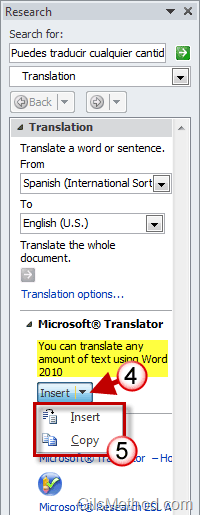
The Research pane will appear on the right side of the Word document window. The translated text should appear (highlighted text). If the text is not translated proceed to the next section.
4. Click on the Insert drop-down list.
5. Click on one of the options, Insert or Copy.
- Insert will insert the translated text into the current document.
- Copy will copy the text to the clipboard so that you can Paste it to another document.
Translation Options
If the text you selected was not translated, please follow the instructions below. This may occur if the translation service is not selected.
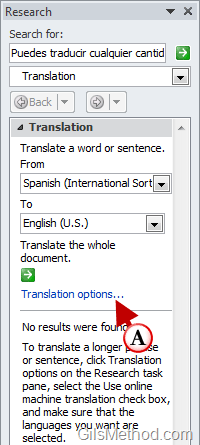
A. Click on the Translation options link.
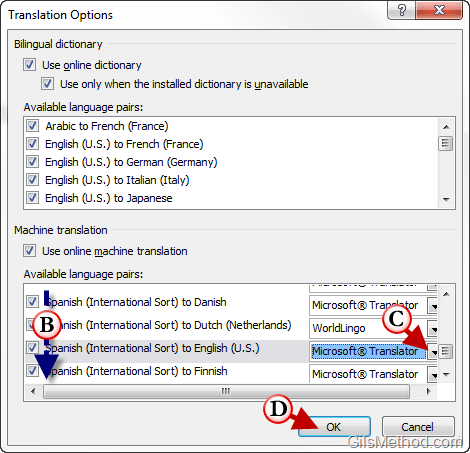
B. Scroll down the list and locate the language pairs you would like to configure. Language pairs are the languages you are translating from and the language you are translating to (English to Spanish translation or Spanish to English translations are two separate pairs). Click on the pair you wish to configure.
C. Click on the small arrow to open the list and click on the Microsoft Translator entry from the list.
D. Click OK to save the settings.
Repeat the translation steps from the beginning of the article.

Sentence that was translated from Spanish to English.



