See More About: , , , ,

How to Add a Hotmail Account to the iPad

by
Originally posted May 27, 2010

We close comments after 30 days on GilsMethod.com and ask that you post questions and issues on our Answers website.

This helps us better serve you by allowing us to keep track of unanswered questions that are usually hidden in long comment threads.

Answers.GilsMethod.com is a community-powered support website where you will be able to post questions, and other users including us will respond with expert advice.

So if you are having trouble with your PC, Mac, iPad, iPhone, or other piece of technology, head over to Answers.GilsMethod.com and ask away.

  • Name

    Hi and thanks for the info,
    It seems that messages sent from the ipad hotmail account do not synchronize with hotmail inboxes.

    Is this right?
    Any solutions?

    Thanks again

  • http://www.gilsmethod.com Gilberto J Perera

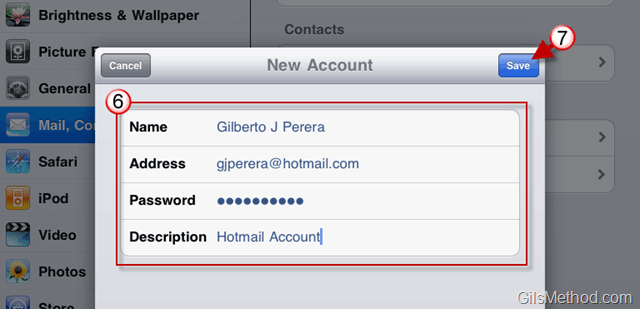
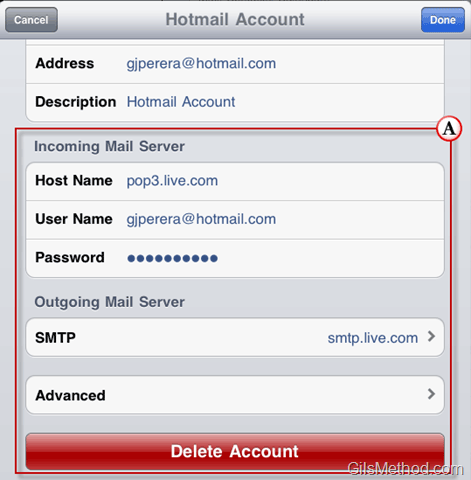
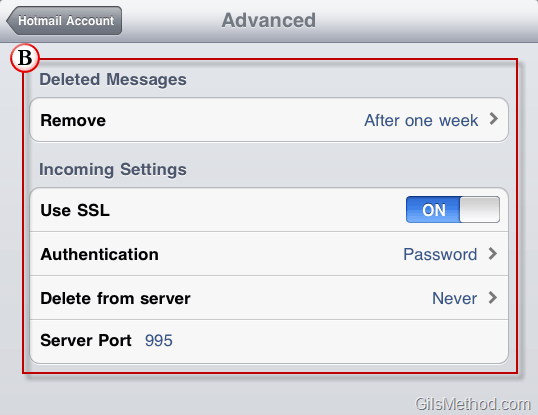
    Make sure that the settings used when you create the account are the following:

    Incoming Server (POP3 Server): pop3.live.com
    Incoming Server POP Port: 995
    Incoming Server POP SSL Encryption: Yes (On or Required)

    Outgoing Server (SMTP Server): smtp.live.com
    Outgoing Server SMTP Port: 25
    Outgoing Server Authentication: Yes (On – Use POP username and password or Hotmail credentials)
    Outgoing Server TLS or SSL Secure Encrypted Connection: Yes (On or Required)

    Please let me know if this helps at all…it also looks like Microsoft is confirming these issues, check it out the following link:
    Official Statement About Hotmail iPad Issue from Microsoft

  • http://www.gilsmethod.com Gilberto J Perera

    Make sure that the settings used when you create the account are the following:

    Incoming Server (POP3 Server): pop3.live.com
    Incoming Server POP Port: 995
    Incoming Server POP SSL Encryption: Yes (On or Required)

    Outgoing Server (SMTP Server): smtp.live.com
    Outgoing Server SMTP Port: 25
    Outgoing Server Authentication: Yes (On – Use POP username and password or Hotmail credentials)
    Outgoing Server TLS or SSL Secure Encrypted Connection: Yes (On or Required)

    Please let me know if this helps at all…it also looks like Microsoft is confirming these issues, check it out the following link:
    Official Statement About Hotmail iPad Issue from Microsoft

  • http://www.gilsmethod.com Gilberto J Perera

    Make sure that the settings used when you create the account are the following:

    Incoming Server (POP3 Server): pop3.live.com
    Incoming Server POP Port: 995
    Incoming Server POP SSL Encryption: Yes (On or Required)

    Outgoing Server (SMTP Server): smtp.live.com
    Outgoing Server SMTP Port: 25
    Outgoing Server Authentication: Yes (On – Use POP username and password or Hotmail credentials)
    Outgoing Server TLS or SSL Secure Encrypted Connection: Yes (On or Required)

    Please let me know if this helps at all…it also looks like Microsoft is confirming these issues, check it out the following link:
    Official Statement About Hotmail iPad Issue from Microsoft

  • http://www.gilsmethod.com Gilberto J Perera

    Make sure that the settings used when you create the account are the following:

    Incoming Server (POP3 Server): pop3.live.com
    Incoming Server POP Port: 995
    Incoming Server POP SSL Encryption: Yes (On or Required)

    Outgoing Server (SMTP Server): smtp.live.com
    Outgoing Server SMTP Port: 25
    Outgoing Server Authentication: Yes (On – Use POP username and password or Hotmail credentials)
    Outgoing Server TLS or SSL Secure Encrypted Connection: Yes (On or Required)

    Please let me know if this helps at all…it also looks like Microsoft is confirming these issues, check it out the following link:
    Official Statement About Hotmail iPad Issue from Microsoft

  • Name

    Thanks for your reply,

    I have the same settings except the outgoing server, was 587 instead of 25. I changed it to 25 , still, messages are being sent from my ipad but then they don’t show in the sent folder in the real hotmail on my pc.
    I also do not get all my hotmail folders on my ipad.

    Thanks for your support.

  • Kelvin

    Hi, does live.com e-mail account works? I mean, my hotmail account works but my other account which is live.com does not?

  • http://www.gilsmethod.com Gilberto J Perera

    Did you try entering the hotmail account settings on this article when adding the Windows Live email account? See the information below, please let me know if it helps.

    Incoming Mail Server.
    Host Name: pop3.live.com
    User Name: “username”@live.com
    Outgoing Mail Server.
    SMTP: smtp.live.com

  • http://www.gilsmethod.com Gilberto J Perera

    Did you try entering the hotmail account settings on this article when adding the Windows Live email account? See the information below, please let me know if it helps.

    Incoming Mail Server.
    Host Name: pop3.live.com
    User Name: “username”@live.com
    Outgoing Mail Server.
    SMTP: smtp.live.com

  • http://www.gilsmethod.com Gilberto J Perera

    Did you try entering the hotmail account settings on this article when adding the Windows Live email account? See the information below, please let me know if it helps.

    Incoming Mail Server.
    Host Name: pop3.live.com
    User Name: “username”@live.com
    Outgoing Mail Server.
    SMTP: smtp.live.com

  • http://www.gilsmethod.com Gilberto J Perera

    Did you try entering the hotmail account settings on this article when adding the Windows Live email account? See the information below, please let me know if it helps.

    Incoming Mail Server.
    Host Name: pop3.live.com
    User Name: “username”@live.com
    Outgoing Mail Server.
    SMTP: smtp.live.com

  • Mario

    How about contacts? Even tried to use iTunes, sending a .csv file to my iPad, but it simply doesn’t work… I don’t feel like adding them one on one. Is there another way?

  • Rob Hartman

    It worked! I followed your instructions and it’s up and running. Thanks.

  • Paul P

    Hiya Giberto, My friend has an IPAD and when you go into Mail at the base of the IPAD then press the + button to retrieve her contact list, this list is Blank….. why would this happen…?

  • http://www.gilsmethod.com Gilberto J Perera

    Has she added her contacts to the iPad? This could be the issue. There are several ways to add contacts to the iPad, you can sync from an existing service, import, and add them manually. Please let me know if you need any help with this.

  • Jm-tan

    Hi Gilberto
    I follow the instruction, only can received mails, cannot sent out. Message say look like there was an error.
    Do you have any clue ?

    Jack

  • http://www.gilsmethod.com Gilberto J Perera

    Jack,

    What email account did you set up? Also does this happen when your ipad is connected to another network? Wr may need to change outgoing server settings, let me know.

    Regards,

    Gilberto J Perera
    Editor-in-Chief, GilsMethod.com

  • Parthiban

    Hi Ajith, can you share how to add hotmail using microsoft exchange, thanks a lot! pls email me at me@parthiban.info.

  • Barbara Benson

    I checked everything on the ipad. and it was just like the link email that you just sent to me. I configure the ipad like you said everything was the same. The SSL was on on the ipad so I left it that way. But how do I check it on my computer? I did not understand that part. You said that I then need to enable it from the hotmail setting. How do I check the hotmail settings? The SSL was on in the ipad. so what do I do next. I don’t know how to check it on the computer please help me.

  • http://www.gilsmethod.com Gilberto J Perera

    Here’s the guide to enabling SSL in Hotmail, but I’m not sure why you are
    having issues accessing emails if you followed the directions in this
    guide…