
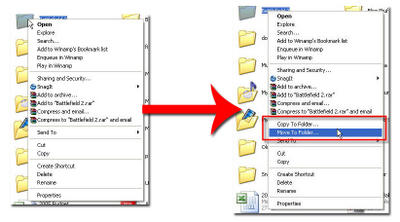
This step-by-step visual guide will show you how to add the ‘Move To’ and ‘Copy To’ command to your context menu. With these two options you won’t have to copy and paste from one directory to the other, you can simply right click on the file you wish to copy/move select either option resulting in a dialog box that will prompt you for the destination of the file you’re moving/copying.
This little timesaver requires the user to modify the registry, however in this tutorial we are not going to directly go into the registry and modify it (there’s too much room for error, and an error in the registry could spell disaster) so instead I have created two registry entries that contain the necessary information to input those values and give you two commands with little effort. Before we modify the registry, we will first make a backup of your registry in case you wish to revert to your current state. Let me know if you have any comments or suggestions for this guide. Download Guide
You will need this file to complete this tutorial.


