See More About: , , , ,

How to Add Google Calendar to Your iPad

by

Google Calendar looks great in Safari for the iPad, but wouldn’t it be nice to access and use your Google Calendars in the iPad’s native Calendar application (which by the way, is gorgeous)? Good, I thought you would. The how-to guide below will show you how to add your Google Calendar account to the iPad so that you can always keep your calendars synchronized between your device and Google’s servers.

NOTE: If you have more than one Google Calendar then you may want to check out the Sync Google Account with Your iPad guide instead and follow the instructions at the end of the guide. The guide below is intended for users that have only one calendar in Google.

Do you own an iPad? You might want to look into protecting your investment with invisibleSHIELD How to Add Google Calendar to Your iPad screen protectors. If you need any help or have questions please post them below.

Are you looking for more iPad how-to guides, tips, and help? Visit our iPad page.

configure google calendar on ipad 10 225x300 How to Add Google Calendar to Your iPad

(click on the images to enlarge)

1. Tap on Settings.
configure google calendar on ipad 18 225x300 How to Add Google Calendar to Your iPad

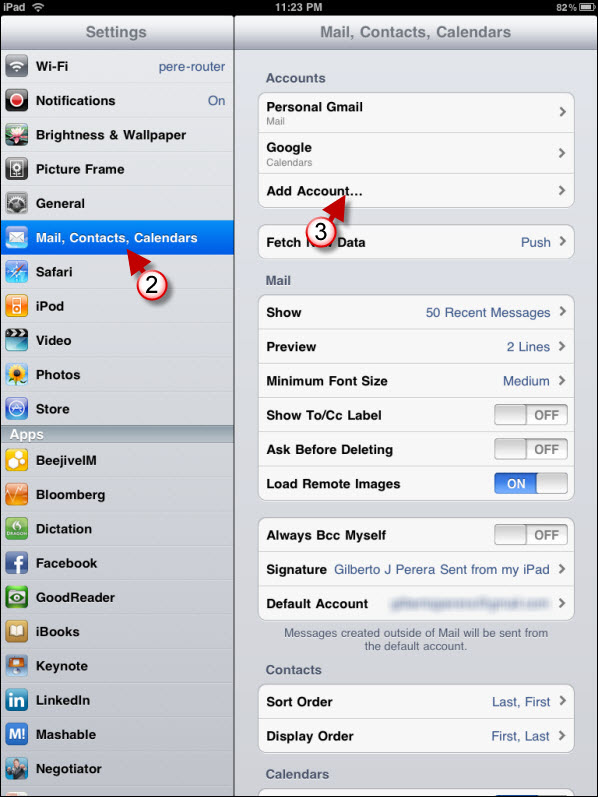
2. Tap on Mail, Contacts, Calendars.

3. Tap on Add Account…

configure google calendar on ipad 13 225x300 How to Add Google Calendar to Your iPad

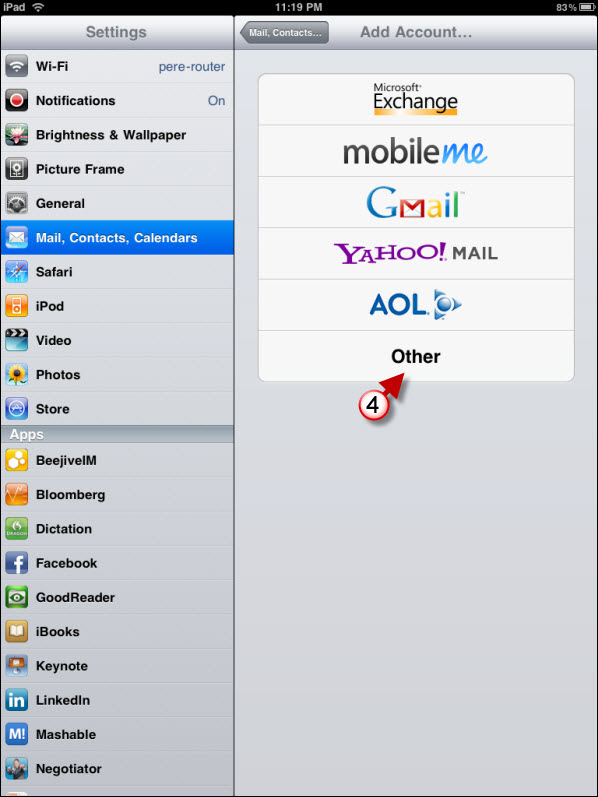
4. Tap on Other

configure google calendar on ipad 14 225x300 How to Add Google Calendar to Your iPad

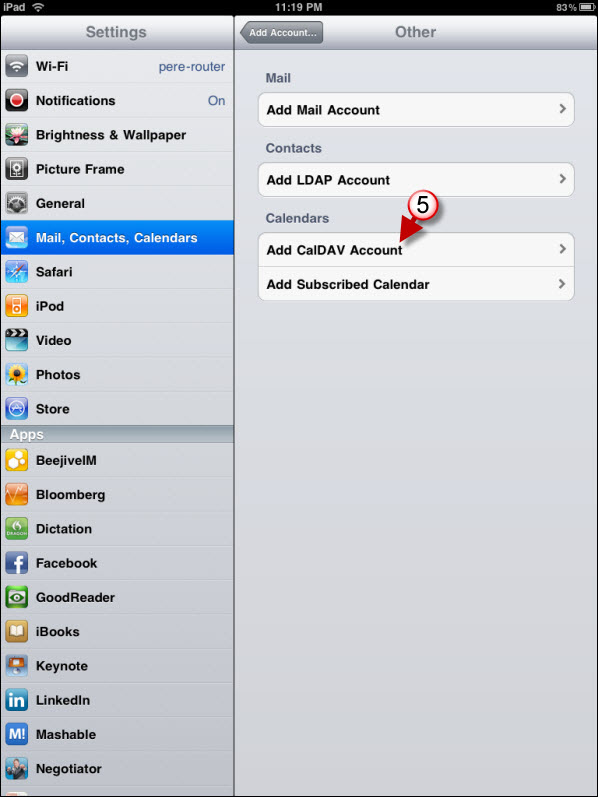
5. Tap on Add CalDAV Account.

configure google calendar on ipad 15 225x300 How to Add Google Calendar to Your iPad

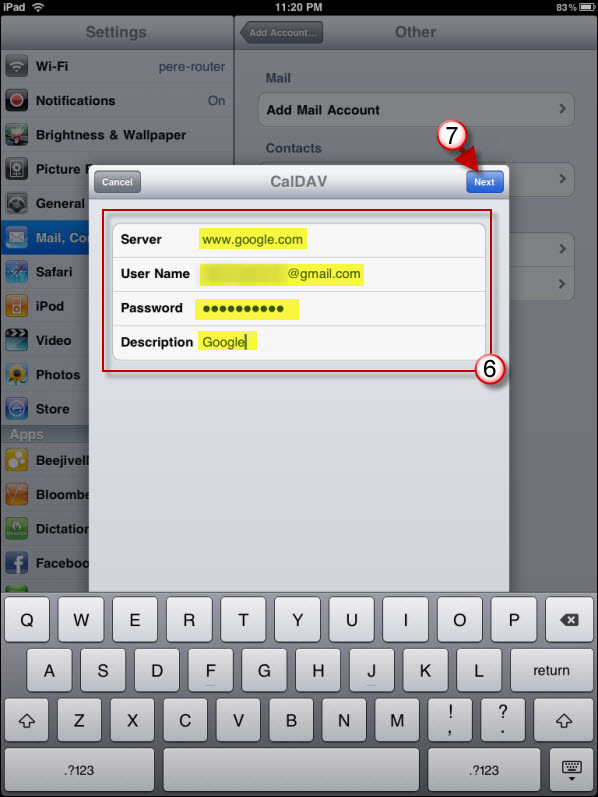
6. Enter your Google Account credentials – make sure that server and email are filled as follows:

Server – www.google.com

User Name – yourname@gmail.com

7. Tap Next

Your settings should be saved. Exit the Settings screen and tap on Calendar.
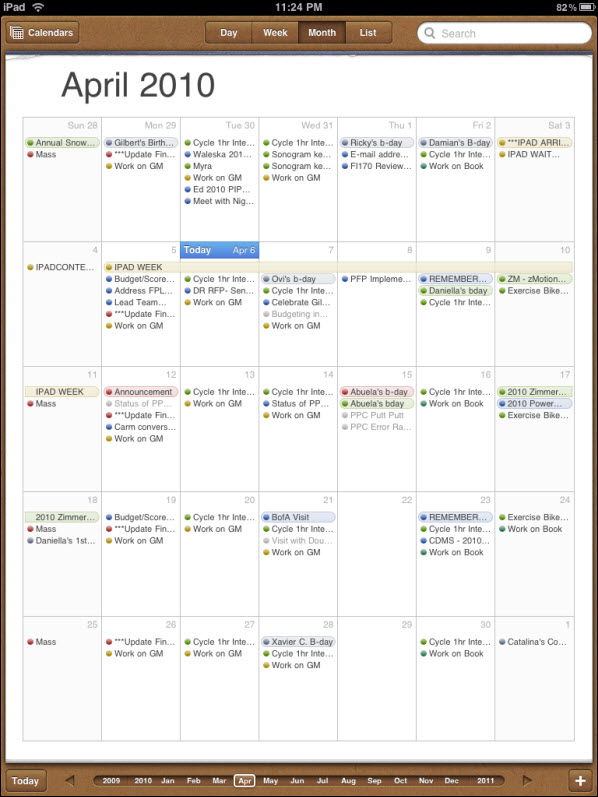
configure google calendar on ipad 19 225x300 How to Add Google Calendar to Your iPad

When Calendar opens your events should appear.

See More About: , , , ,
Originally posted Apr 06, 2010

We close comments after 30 days on GilsMethod.com and ask that you post questions and issues on our Answers website.

This helps us better serve you by allowing us to keep track of unanswered questions that are usually hidden in long comment threads.

Answers.GilsMethod.com is a community-powered support website where you will be able to post questions, and other users including us will respond with expert advice.

So if you are having trouble with your PC, Mac, iPad, iPhone, or other piece of technology, head over to Answers.GilsMethod.com and ask away.

  • TIGOS

    Great, but i want to make Google Calendars default when im create an event. Its possible?

  • TIGOS

    Great, but i want to make Google Calendars default when im create an event. Its possible?

  • TIGOS

    Great, but i want to make Google Calendars default when im create an event. Its possible?

  • TIGOS

    Great, but i want to make Google Calendars default when im create an event. Its possible?

  • http://intensedebate.com/people/gjperera gjperera

    Tap on settings > mail calendar contacts> then scroll to the bottom of the settings pane on the right and you will see the option to specify which calendar to use as default. I'll post screenshots later tonight. Hope it helps.

  • http://intensedebate.com/people/gjperera gjperera

    Tap on settings > mail calendar contacts> then scroll to the bottom of the settings pane on the right and you will see the option to specify which calendar to use as default. I'll post screenshots later tonight. Hope it helps.

  • http://intensedebate.com/people/gjperera gjperera

    Tap on settings > mail calendar contacts> then scroll to the bottom of the settings pane on the right and you will see the option to specify which calendar to use as default. I'll post screenshots later tonight. Hope it helps.

  • http://intensedebate.com/people/gjperera gjperera

    Tap on settings > mail calendar contacts> then scroll to the bottom of the settings pane on the right and you will see the option to specify which calendar to use as default. I'll post screenshots later tonight. Hope it helps.

  • http://www.howtogeek.com/howto/14529/the-complete-list-of-ipad-tips-tricks-and-tutorials/ The Complete List of iPad Tips, Tricks, and Tutorials – How-To Geek

    [...] How to Add Google Calendar to Your iPad [...]

  • Bodie

    Thank you for your post. I have everything set up, except I have 3 calenders that I use with the Gmail Account and I can only get the first one to sync. Why won't my other two calendars sync?

  • Bodie

    Thank you for your post. I have everything set up, except I have 3 calenders that I use with the Gmail Account and I can only get the first one to sync. Why won't my other two calendars sync?

  • Bodie

    Thank you for your post. I have everything set up, except I have 3 calenders that I use with the Gmail Account and I can only get the first one to sync. Why won't my other two calendars sync?

  • Bodie

    Thank you for your post. I have everything set up, except I have 3 calenders that I use with the Gmail Account and I can only get the first one to sync. Why won't my other two calendars sync?

  • http://intensedebate.com/people/gjperera gjperera
  • http://intensedebate.com/people/gjperera gjperera
  • http://intensedebate.com/people/gjperera gjperera
  • http://intensedebate.com/people/gjperera gjperera

    I added this (http://www.gilsmethod.com/how-to-sync-your-gmail-google-contacts-and-calendar-with-the-ipad)” target=”_blank”>” target=”_blank”>(http://www.gilsmethod.com/how-to-sync-your-gmail-google-contacts-and-calendar-with-the-ipad) how-to that should help you with your problem, particularly the seconds section of the article. Cheers!

  • Sandra

    Thank you, thank you, thank you! I have been trying to figure this out. I really appreciate you step by step directions.

  • Sandra

    Thank you, thank you, thank you! I have been trying to figure this out. I really appreciate you step by step directions.

  • Sandra

    Thank you, thank you, thank you! I have been trying to figure this out. I really appreciate you step by step directions.

  • Sandra

    Thank you, thank you, thank you! I have been trying to figure this out. I really appreciate you step by step directions.

  • http://intensedebate.com/people/gjperera gjperera

    You are welcome, glad you found the instructions useful.

  • http://intensedebate.com/people/gjperera gjperera

    You are welcome, glad you found the instructions useful.

  • http://intensedebate.com/people/gjperera gjperera

    You are welcome, glad you found the instructions useful.

  • http://intensedebate.com/people/gjperera gjperera

    You are welcome, glad you found the instructions useful.

  • http://www.gilsmethod.com/how-to-sync-your-gmail-google-contacts-and-calendar-with-the-ipad How to Sync Your Gmail, Google Contacts, and Calendar with the iPad | GilsMethod.com

    [...] Microsoft Exchange account on your iPad you will need to use these links to add Gmail, Google Calendar, and Contacts to your iPad. The iPad can only sync one Exchange type account at any given [...]

  • Download Ipad Ebooks

    Ipad is not a hype.Millions are sold in less than a month and demand will increase in a few month.

  • Download Ipad Ebooks

    Ipad is not a hype.Millions are sold in less than a month and demand will increase in a few month.

  • Download Ipad Ebooks

    Ipad is not a hype.Millions are sold in less than a month and demand will increase in a few month.

  • Download Ipad Ebooks

    Ipad is not a hype.Millions are sold in less than a month and demand will increase in a few month.

  • http://mymoxie.com Nick

    This was very helpful. Too bad I can’t add an event and have it go to a specific calendar. I just made a bookmark to my Google Calendar to my home screen.

  • http://mymoxie.com Nick

    This was very helpful. Too bad I can’t add an event and have it go to a specific calendar. I just made a bookmark to my Google Calendar to my home screen.

  • http://mymoxie.com Nick

    This was very helpful. Too bad I can’t add an event and have it go to a specific calendar. I just made a bookmark to my Google Calendar to my home screen.

  • http://mymoxie.com Nick

    This was very helpful. Too bad I can’t add an event and have it go to a specific calendar. I just made a bookmark to my Google Calendar to my home screen.

  • http://www.gilsmethod.com Gil

    Nick,

    You should be able to select the calendar you wish to add your event to. The option is directly below Alert. Let me know if you need help with this. Thanks for passing by.

  • http://www.gilsmethod.com Gil

    Nick,

    You should be able to select the calendar you wish to add your event to. The option is directly below Alert. Let me know if you need help with this. Thanks for passing by.

  • http://www.gilsmethod.com Gil

    Nick,

    You should be able to select the calendar you wish to add your event to. The option is directly below Alert. Let me know if you need help with this. Thanks for passing by.

  • http://www.gilsmethod.com Gil

    Nick,

    You should be able to select the calendar you wish to add your event to. The option is directly below Alert. Let me know if you need help with this. Thanks for passing by.

  • Lisa

    I can’t get my google calendar page to scroll down to later in the day on the ipad . Am I missing something really simple here?

  • Monty

    Thanks for this great how to post! Did the trick!

  • http://www.gilsmethod.com Gil

    Monty,

    Glad it worked for you. Make sure to visit the iPad page on GilsMethod.com/iPad

  • http://www.gilsmethod.com Gil

    Monty,

    Glad it worked for you. Make sure to visit the iPad page on GilsMethod.com/iPad

  • http://www.gilsmethod.com Gil

    Monty,

    Glad it worked for you. Make sure to visit the iPad page on GilsMethod.com/iPad

  • http://www.gilsmethod.com Gil

    Monty,

    Glad it worked for you. Make sure to visit the iPad page on GilsMethod.com/iPad

  • CR

    I looked at half a dozen different sites trying to set up a “family” of ipads… yours was a big help.

    Now, it also created a problem that others may be experiencing.

    I wanted everyone in the family to see each others calendar – where mom, dad and all the kids are…. but I don’t need to get an event reminder to all of their activities.

    Is there any way to adjust settings so that you only get event reminders for the default calendar? and not all of the others?

    Thanks,
    CR

  • http://www.gilsmethod.com Gil

    CR – You got me. I’ve looked throughout and can’t seem to find something about disabling shared calendar notifications, I too have this problem with my wife’s calendar. I’m sure there’s something out there. If I find it I’ll post it here. In the meantime if you find something, please share it in this comment thread. Glad you found the other articles useful. Check back soon…I’m always adding new articles. Thanks.

  • http://www.gilsmethod.com Gil

    CR – You got me. I’ve looked throughout and can’t seem to find something about disabling shared calendar notifications, I too have this problem with my wife’s calendar. I’m sure there’s something out there. If I find it I’ll post it here. In the meantime if you find something, please share it in this comment thread. Glad you found the other articles useful. Check back soon…I’m always adding new articles. Thanks.

  • http://www.gilsmethod.com Gil

    CR – You got me. I’ve looked throughout and can’t seem to find something about disabling shared calendar notifications, I too have this problem with my wife’s calendar. I’m sure there’s something out there. If I find it I’ll post it here. In the meantime if you find something, please share it in this comment thread. Glad you found the other articles useful. Check back soon…I’m always adding new articles. Thanks.

  • http://www.gilsmethod.com Gil

    CR – You got me. I’ve looked throughout and can’t seem to find something about disabling shared calendar notifications, I too have this problem with my wife’s calendar. I’m sure there’s something out there. If I find it I’ll post it here. In the meantime if you find something, please share it in this comment thread. Glad you found the other articles useful. Check back soon…I’m always adding new articles. Thanks.

  • Karen

    Thanks so much for the how-to plus screenshots, So glad I found this and I’m looking forward to catching up on your other articles.

  • http://www.gilsmethod.com Gilberto J Perera

    Karen,

    Thanks for the great feedback. I hope you find the existing and upcoming articles useful. Make sure to visit – http://www.gilsmethod.com/iPad

  • http://www.gilsmethod.com Gilberto J Perera

    Karen,

    Thanks for the great feedback. I hope you find the existing and upcoming articles useful. Make sure to visit – http://www.gilsmethod.com/iPad

  • http://www.gilsmethod.com Gilberto J Perera

    Karen,

    Thanks for the great feedback. I hope you find the existing and upcoming articles useful. Make sure to visit – http://www.gilsmethod.com/iPad

  • http://www.gilsmethod.com Gilberto J Perera

    Karen,

    Thanks for the great feedback. I hope you find the existing and upcoming articles useful. Make sure to visit – http://www.gilsmethod.com/iPad

  • http://www.ipadforums.net/new-member-introductions-site-assistance/4504-new-user-columbus-ohio.html#post32961 New user in Columbus, Ohio – Apple iPad Forum

    [...] at work and for personal stuff. However, I did find this but don't know if it will work. Try this: How to Add Google Calendar to Your iPad | GilsMethod.com Welcome again and good luck. __________________ 32 GB WiFi [...]

  • http://pjmb.wordpress.com/2010/06/08/business-ipad-5-mails-und-kalender-tunen/ Business iPad #5: Mails und Kalender tunen « Projekt Management Beratung

    [...] Gilberto Perera hat ein Tutorial für das Abonnieren von Google-Kalendern für das iPad veröffentlicht. Darüber hinaus empfehle ich noch das Abo der Kalenderwochen um das Leben zu vereinfachen: ical.mac.com/coiplet/Kalenderwochen.ics. [...]

  • http://stevepye.me Steve Pye

    I did this, and it worked, however I have several Google Calendars which are also shared and available (and which appear as delegates in iCal on OS X), but none of those calendars appear in the Calendar app on the iPad… only my primary calendar appears in the calendar list in the upper left. Any ideas why?

  • http://stevepye.me Steve Pye

    I did this, and it worked, however I have several Google Calendars which are also shared and available (and which appear as delegates in iCal on OS X), but none of those calendars appear in the Calendar app on the iPad… only my primary calendar appears in the calendar list in the upper left. Any ideas why?

  • http://stevepye.me Steve Pye

    I did this, and it worked, however I have several Google Calendars which are also shared and available (and which appear as delegates in iCal on OS X), but none of those calendars appear in the Calendar app on the iPad… only my primary calendar appears in the calendar list in the upper left. Any ideas why?

  • http://stevepye.me Steve Pye

    I did this, and it worked, however I have several Google Calendars which are also shared and available (and which appear as delegates in iCal on OS X), but none of those calendars appear in the Calendar app on the iPad… only my primary calendar appears in the calendar list in the upper left. Any ideas why?

  • http://www.gilsmethod.com Gilberto J Perera

    Steve,

    Take a look at this article (http://www.gilsmethod.com/how-to-sync-your-gmail-google-contacts-and-calendar-with-the-ipad) which should resolve the issue you are encountering.

    Read the lower portion of the article that discusses more than one Google Calendar. Let me know if this helps. Good luck.

  • http://www.gilsmethod.com Gilberto J Perera

    Steve,

    Take a look at this article (http://www.gilsmethod.com/how-to-sync-your-gmail-google-contacts-and-calendar-with-the-ipad) which should resolve the issue you are encountering.

    Read the lower portion of the article that discusses more than one Google Calendar. Let me know if this helps. Good luck.

  • http://www.gilsmethod.com Gilberto J Perera

    Steve,

    Take a look at this article (http://www.gilsmethod.com/how-to-sync-your-gmail-google-contacts-and-calendar-with-the-ipad) which should resolve the issue you are encountering.

    Read the lower portion of the article that discusses more than one Google Calendar. Let me know if this helps. Good luck.

  • http://www.gilsmethod.com Gilberto J Perera

    Steve,

    Take a look at this article (http://www.gilsmethod.com/how-to-sync-your-gmail-google-contacts-and-calendar-with-the-ipad) which should resolve the issue you are encountering.

    Read the lower portion of the article that discusses more than one Google Calendar. Let me know if this helps. Good luck.

  • Alex

    Is there a way to sync multiple colanders without using the Microsoft exchange method? I am already using the one exchange account.

  • Paige K

    I was able to follow the steps until 7A. No “calendars” button in iPad calendar… Def. Need all calendars to display. Thanks.

  • http://www.gilsmethod.com Gilberto J Perera

    Paige K,

    Thanks for your comment. You might want to take a look at this article (http://www.gilsmethod.com/how-to-sync-your-gmail-google-contacts-and-calendar-with-the-ipad) that will walk you through the process of adding multiple calendars from Google. Please let me know if you need any help with this.

  • http://www.gilsmethod.com Gilberto J Perera

    Paige K,

    Thanks for your comment. You might want to take a look at this article (http://www.gilsmethod.com/how-to-sync-your-gmail-google-contacts-and-calendar-with-the-ipad) that will walk you through the process of adding multiple calendars from Google. Please let me know if you need any help with this.

  • http://www.gilsmethod.com Gilberto J Perera

    Paige K,

    Thanks for your comment. You might want to take a look at this article (http://www.gilsmethod.com/how-to-sync-your-gmail-google-contacts-and-calendar-with-the-ipad) that will walk you through the process of adding multiple calendars from Google. Please let me know if you need any help with this.

  • http://www.gilsmethod.com Gilberto J Perera

    Paige K,

    Thanks for your comment. You might want to take a look at this article (http://www.gilsmethod.com/how-to-sync-your-gmail-google-contacts-and-calendar-with-the-ipad) that will walk you through the process of adding multiple calendars from Google. Please let me know if you need any help with this.

  • Justin

    Hey,
    Thanks for the great post – super clear and very easy to follow.

    Just a quick question, if you have the time – can you sync the tasks too from Google or do you recommend a different task management app of some sort?
    Ta

  • http://katherinejulia.wordpress.com/2010/07/25/ipad-tricks-tips-and-hints/ iPad tricks, tips and hints « Katherine Julia

    [...] Instructions for adding your Google calendar to the Cal App – Gils Method. [...]

  • http://www.gilsmethod.com Gilberto J Perera

    Justin,

    At this time there is no way to sync the Google Tasks to your iPhone. You could always access them using the mobile version – m.google.com/tasks (on your iPhone)

    You could also use Producteev (free) which is an online task manager that syncs to your iPhone. You could also use Remember the Milk, but it requires a paid subscription for the iPhone app.

    Hope this helps.

  • http://www.gilsmethod.com Gilberto J Perera

    Justin,

    At this time there is no way to sync the Google Tasks to your iPhone. You could always access them using the mobile version – m.google.com/tasks (on your iPhone)

    You could also use Producteev (free) which is an online task manager that syncs to your iPhone. You could also use Remember the Milk, but it requires a paid subscription for the iPhone app.

    Hope this helps.

  • http://www.gilsmethod.com Gilberto J Perera

    Justin,

    At this time there is no way to sync the Google Tasks to your iPhone. You could always access them using the mobile version – m.google.com/tasks (on your iPhone)

    You could also use Producteev (free) which is an online task manager that syncs to your iPhone. You could also use Remember the Milk, but it requires a paid subscription for the iPhone app.

    Hope this helps.

  • http://www.gilsmethod.com Gilberto J Perera

    Justin,

    At this time there is no way to sync the Google Tasks to your iPhone. You could always access them using the mobile version – m.google.com/tasks (on your iPhone)

    You could also use Producteev (free) which is an online task manager that syncs to your iPhone. You could also use Remember the Milk, but it requires a paid subscription for the iPhone app.

    Hope this helps.

  • DesQEDo

    @alex
    If MSExchange is in use, try NuevaSync.com. Works like a charm and is free.

  • http://www.gilsmethod.com Gilberto J Perera

    Thanks for the suggestion.

  • http://www.gilsmethod.com Gilberto J Perera

    Thanks for the suggestion.

  • http://www.gilsmethod.com Gilberto J Perera

    Thanks for the suggestion.

  • http://www.gilsmethod.com Gilberto J Perera

    Thanks for the suggestion.

  • John

    Simply start typing your comment…

  • Dave.A

    Very nice mate! Easy and straightforward! Oh…. and it works!

  • http://www.gilsmethod.com Gilberto J Perera

    Dave,

    Glad you found it useful, make sure to check out our other iPad articles – http://www.gilsmethod.com/ipad

    Thanks.

  • Annedmatthews

    Thanks. Your directions were easy to follow. I had been sent astray by some other instructions. I don’t even mind the ads.

  • http://www.gilsmethod.com Gilberto J Perera

    Anned,

    I’m glad you found the instructions useful and that you don’t mind the ads…we bloggers have to make money somehow ;)

  • Dennis Conklin

    Great job, saved me a lot of time.

  • Ktdid1969

    THANK YOU!!!! Love the step by step and perfect directions.

  • http://johannwein.wordpress.com/2010/08/24/ipad-werd-ich-mir-holen/ iPad – werd ich mir holen « Notiz-Blog

    [...] http://www.gilsmethod.com/how-to-add-google-calendar-to-your-ipad Kategorien:Allgemeines, Internet, Software, Technik Schlagwörter:iPad Kommentare (0) Trackbacks (0) Einen Kommentar hinterlassen Trackback [...]

  • http://www.gilsmethod.com Gilberto J Perera

    Glad you found the instructions useful. Thanks.

  • MACximize

    I have this problem. I’ve created 10 Google calendars, but only 7 are appearing in iPhone, iPad, or on my Mac using iCal or BusyCal. Suggestions? Btw, its always the same calendars that appear.

  • The Complete List of iPad Tips, Tricks, and Tutorials

    [...] [...]

  • Groenendijk Ton

    Great! Thank you very much.

  • http://www.parkylondon.com Parkylondon

    Brilliant. Thanks.

  • http://www.gilsmethod.com Gilberto J Perera

    No problem. If you’re looking for other iPad how-to’s make sure you visit http://www.gilsmethod.com/ipad

  • http://www.gilsmethod.com Gilberto J Perera

    Thank you, glad you found it useful.

  • http://www.gilsmethod.com Gilberto J Perera
  • JulienA

    Hi, I made the synchronization through an account Microsoft Exchange. It works perfect even with various calendars. But If adding an event, I make a mistacke and choose the wrong calendar, I can’t modify it. If I click on the event, I can modify everything except the calendar. Normal ? Solution ? Many thanks. Julien

  • http://www.gilsmethod.com Gilberto J Perera

    Julien,

    I just tried what you described and it looks like it is a limitation on the iPad. I tried changing the Calendar on an existing event and could not change it. The only workaround I can think of is deleting and recreating the event. Sorry.

  • JulienA

    OK thank you. I hope iOS4 of November will solve it…

  • JulienA

    OK thank you. I hope iOS4 of November will solve it…

  • Javelincreel

    thanks !!!

  • Bdhelmer

    thanks a MILLION … awesome help!

  • http://twitter.com/realworld Daniel

    Thank you!

  • Buckleysg

    That’s fantastic. thank you for your help

  • http://www.gilsmethod.com Gilberto J Perera

    Not a problem, make sure to visit http://www.gilsmethod.com/ipad for more iPad how-to guides.

  • http://www.gilsmethod.com Gilberto J Perera

    Glad you found it useful.

  • http://www.gilsmethod.com Gilberto J Perera

    Not a problem. Glad you found it useful.

  • http://www.gilsmethod.com Gilberto J Perera

    Glad you found it useful.

  • http://www.gilsmethod.com Gilberto J Perera

    I’ll keep my fingers crossed.

  • Anne Hoag

    i would never have figured this out on my own, pc-head that i am. thanks very much. love my ipad despite my anti-apple stance on most computing choices.

  • http://www.gilsmethod.com Gilberto J Perera

    Anne,

    I am with you on that. Glad you found the post useful.

  • http://www.gilsmethod.com Gilberto J Perera

    Anne,

    I am with you on that. Glad you found the post useful.

  • Chris Austill

    Hello,
    Thank you for this ! One question: I have 5 calendars to display. The application is only showing two of them. I can’t find which setting to tap to see if I can add more? (You say to tap on Calendars to specify which ones to display, but I can’t find anything that specifies which calendars…

  • DadOZach

    I love it! Tried to do it on my own this AM and couldn’t figure it out. One additional question, though… my Gmail Calendar seems to sync down to my iPad, but my iPad Calendar does not seem to Sync up to Gmail. Am I missing something or is that just the way it is? Thanks again.

  • http://www.gilsmethod.com Gilberto J Perera

    It should be both ways. If it’s not working then try removing and adding the
    account again.

    Regards,

    *Gilberto J Perera*, Microsoft MVP
    Editor-in-Chief, GilsMethod.com | Tech How-to
    Guides for the Rest of Usâ„¢
    Subscribe: Facebook
    Twitter Blog
    RSS

  • Boston Chris

    I found out how to add multiple calendars to my iPad native calendar application from Google Calendars. (from ipod-candy.com, btw)

    To do this you now next need to go to (www.google.com/calendar/iphoneselect) from this link you need to login to your account and select the calendars that will be synchronized to your outlook and iPad calendar.

  • JB

    Thank you so much this was very helpful and I now have my calendar YEA!

  • Vanessa

    I followed the directions above and it worked fine, excepting that on my desk top, and mobile, I have 3 diff calenders on google, i.e. work, then personal, etc. only the work calender loaded, but I can’t figure out how to make the personal one load, am using iPad!

  • Quintin47

    Thanks mate. I was looking for something like this !

  • Abhi015

    lol… I am in the exact same boat with the anti apple stance except my love for my ipad.

  • http://leadteachlearn.org/you-learning.org/?p=20 yoU-Learning Blog
  • Mpenamatsa

    Was the only one of many, many which was clear and solved my problem like a charm! Thanks.

  • Orlandosrivera

    Great

  • David

    Why bother with this?

    Instead, you should simply add your Google account as an Exchange server account. Then, your email, contacts, and calendar will all be linked to your Google account.

    Google has their own Exchange Server which links to all of their Google Email, calendar, and email contacts. The only problem is that Google doesn’t sync your Google contact groups.

  • judie

    Thanks for this. It worked – but I have a question. Any idea why when I synched my gmail calendar to my ipad my ipad now has double entries for all my calendar items?

  • http://www.gilsmethod.com Gilberto J Perera

    Judie,

    I would remove the account and try again. This can happen sometimes. Let me know if it resolves the issue.

  • http://www.gilsmethod.com Gilberto J Perera
  • http://www.gilsmethod.com Gilberto J Perera
  • http://www.gilsmethod.com Gilberto J Perera
  • http://www.gilsmethod.com Gilberto J Perera
  • Eugenio

    Great! This was very easy. You have a new fan.

  • http://www.gilsmethod.com Gilberto J Perera

    Thanks for the kind comments. Hope you find the other how-to guides as
    useful.

  • Pat

    My gmail calendar and ipad are sync except that the time is off 3 hours no matter if I post it on the ipad then my gmail calendar on my computer is off 3 hours same goes when I post the event on my computer calendar then the iPad calendar is off 3 hours. I made sure both calendars are in the same time zone. Can anyone fix this problem?

  • http://www.gilsmethod.com Gilberto J Perera

    Have you tried to remove the account from your ipad and add it back again?

  • http://herve.rozec.free.fr/wordpress/?p=4056 AirV's Blog » Archive du blog » Ipad tips

    [...] How to Add Google Calendar to Your iPad [...]

  • Takodude

    It only shows one of my calendars. I can’t seem to open all my calendars.

  • http://www.gilsmethod.com Gilberto J Perera

    Please read this guide if you have more than one calendar – http://www.gilsmethod.com/how-to-sync-your-gmail-google-contacts-and-calendar-with-the-ipad

    Please let me know if you have any questions.

  • Dawnbrolin

    Thank you so much!!!

  • http://dewberry.co.za/the-idiots-guide-to-jailbreaking-the-ipad/ The Idiots Guide to Jailbreaking the iPad – Shaun Dewberry

    [...] I mean by “properly”) iOS 4 actually fixes this crap, but the iPad is still iOS3.Then sync your Google Calendar(s) with your iPad.Install Firefox Home to get your bookmarks and open tabs syncing for later reading from the [...]

  • Bonniej55duncan

    Woo hoo – thanks so much

  • Leahpea

    Thank you so much. I went into the Apple store twice since getting my iPad last week and nobody could help me do this (asking how to add multiple calendars in various colors to the main iPad calendar). The last guy was able to tell me that it was pulling from google, but I had to research it and come to your site to actually get it to work. I really appreciate it!

  • http://www.gilsmethod.com Gilberto J Perera

    Awesome, glad you found our site useful. Make sure to check out our other
    iPad related articles – http://www.gilsmethod.com/ipad

  • http://marcin.floryan.pl/ Marcin Floryan

    Google have changed the seetings and by default, only the main calendar is synced but it’s possible to choose additional calendars to by synced.

  • http://cgibbons.wordpress.com/2011/01/21/app-app-and-away-2/ App, app and away « Breezeblog

    [...] download individually). No support for Calendar though – although it’s easy enough to set this up in the iPad Calendar [...]

  • Annie

    this was so so so easy to follow. thankyou

  • http://www.gilsmethod.com Gilberto J Perera

    Awesome. Glad you found the guide useful. Make sure to check out our other
    iPad guides, http://www.gilsmethod.com/ipad

    Like the GilsMethod.com Facebook page for a
    chance to win an iPod Touch and other prizes.

  • http://twitter.com/TracyDempsey Tracy Dempsey

    Hi there, thanks for the tip – in case anyone else needs this additional step, I had to go to https://www.google.com/calendar/iphoneselect on the iPad itself and select the additional Google calendars I wanted to display. (It only shows the primary by default, according to the Google Calendar help article I read after this.)

  • http://twitter.com/TracyDempsey Tracy Dempsey

    Hi there,
    Thanks for the tip – just in case anyone else needs this additional step, I had to go to https://www.google.com/calendar/iphoneselect on the iPad and check all my Google calendars for them all to show in the iPad’s calendar. (It defaults to showing the primary calendar only, according to the Google cal help page.)

    Cheers,
    Tracy

  • Daintrc

    The step re the CALDAV was the bit I was missing to get the automatic synching to run. I had it under the email account settuing which did some of the synching but didn’t when I expected it to. This did it when the calendar starts.

  • http://www.gilsmethod.com Gilberto J Perera

    Glad it worked for you.

    Sent from my iPad

  • Bdhelmer

    AWESOME … thanks a TON …

  • Nia

    Very easy(no BS)
    Thanks

  • http://www.gilsmethod.com Gilberto J Perera

    Thanks, I hope you find the other guides as useful.

    Regards,

    Gilberto J Perera
    Editor-in-Chief, GilsMethod.com

  • Elly

    I have added the gmail account to the iPad and it was working fine for a bit. Nowit is not updating and has removed everything from my calendar. How do I fix this, it appears that I am still getting mail just not the calendar. Thanks!

  • http://www.gilsmethod.com Gilberto J Perera

    Did you check your account in the Settings section to make sure that syncing is enabled for the calendar? Thats were I’d start looking.

    Regards,

    Gilberto J Perera
    Editor-in-Chief, GilsMethod.com

  • http://junaidghory.wordpress.com/2011/09/03/the-complete-list-of-ipad-tips-tricks-and-tutorials/ The Complete List of iPad Tips, Tricks, and Tutorials « Junaid Ghory

    [...] How to Add Google Calendar to Your iPad [...]