See More About: , , ,

How to Send Pictures Via Email Using the iPad

by

So you’ve got a ton of photos transferred to your iPad and you are itching to share them with family and friends via email, but you’re wondering how?

It’s not like there is an Attach button when composing emails…you can however copy and paste your images into the body of a message, but that’s a little clumsy.

How about following the instructions below for an easier method to share single or multiple photos via email.

Send a Single Photo on the iPad

To send a single photo, follow the instructions below.

how to email pictures with your ipad 0 225x300 How to Send Pictures Via Email Using the iPad

1. Tap on Photos.

how to email pictures with your ipad 1 225x300 How to Send Pictures Via Email Using the iPad

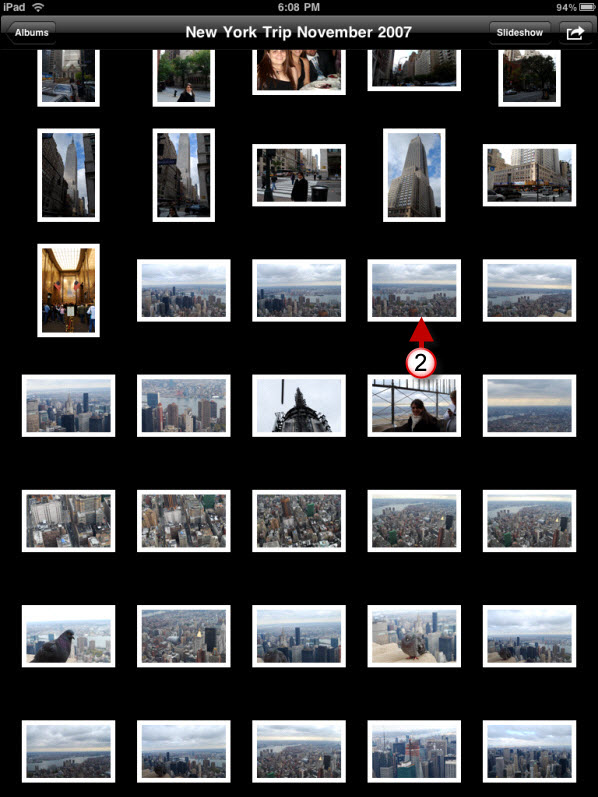
2. Tap on the picture you wish to email (this will open the image).

how to email pictures with your ipad 3 225x300 How to Send Pictures Via Email Using the iPad

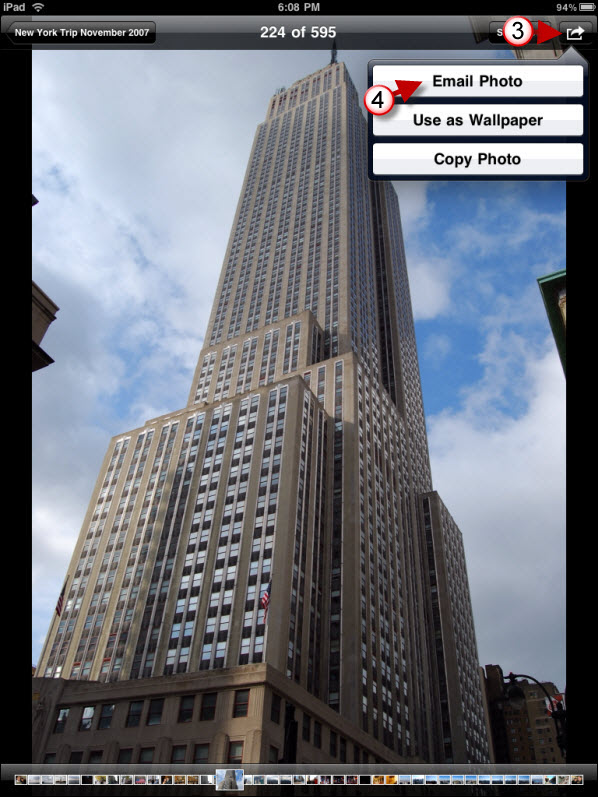
3. Tap on the Options button located on the upper right corner of the screen.

4. Tap on Email Photo from the menu.
how to email pictures with your ipad 4 225x300 How to Send Pictures Via Email Using the iPad

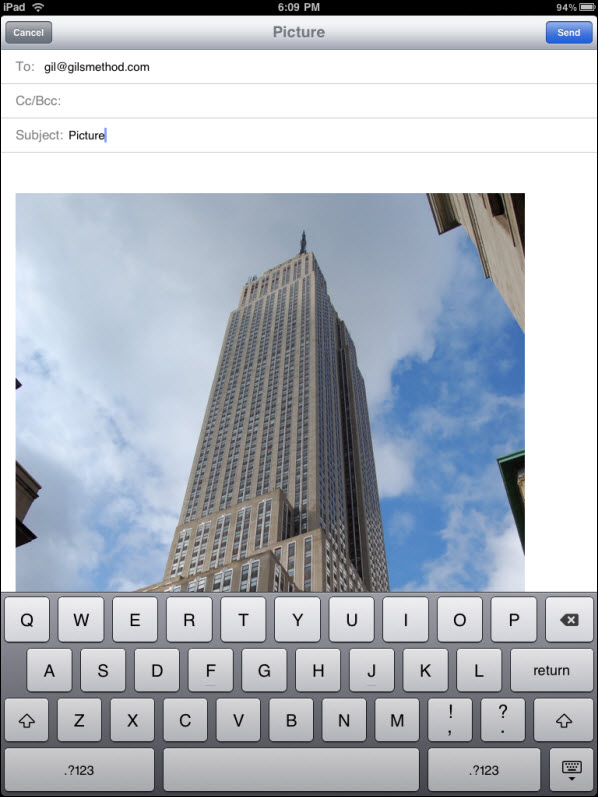
A new email message should appear with your picture included in the body of the message. Enter email address and Send.

Send More than One Photo Using the iPad

To send multiple photos at once, repeat Step 1 above.

how to email pictures with your ipad 5 225x300 How to Send Pictures Via Email Using the iPad

1. Without tapping on an image, tap on the Options button located on the upper right corner of the screen.
how to email pictures with your ipad 6 225x300 How to Send Pictures Via Email Using the iPad

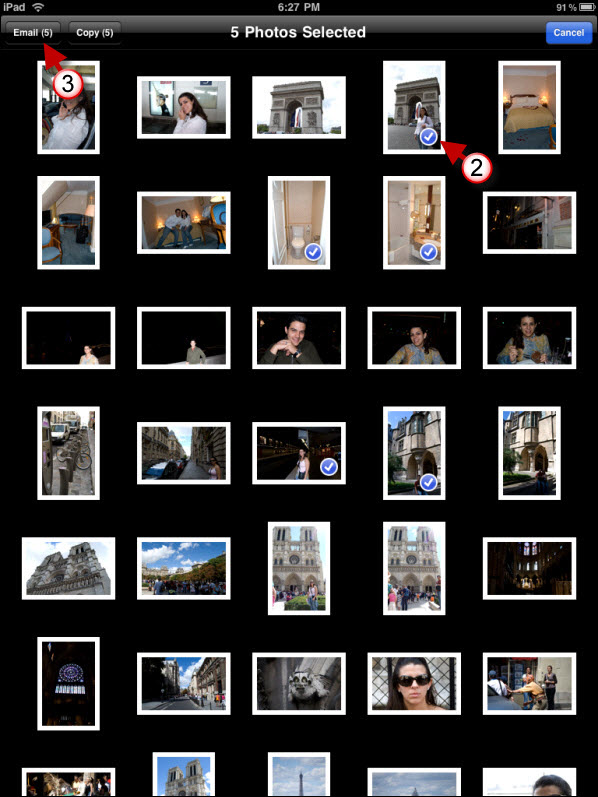
2. Tap on the images you wish to send. You will notice that as you tap on the images a small check mark will appear indicating that the image has been selected. To deselect an image simply tap on it again.

3. Tap on the Email (#) button located on the upper left corner.
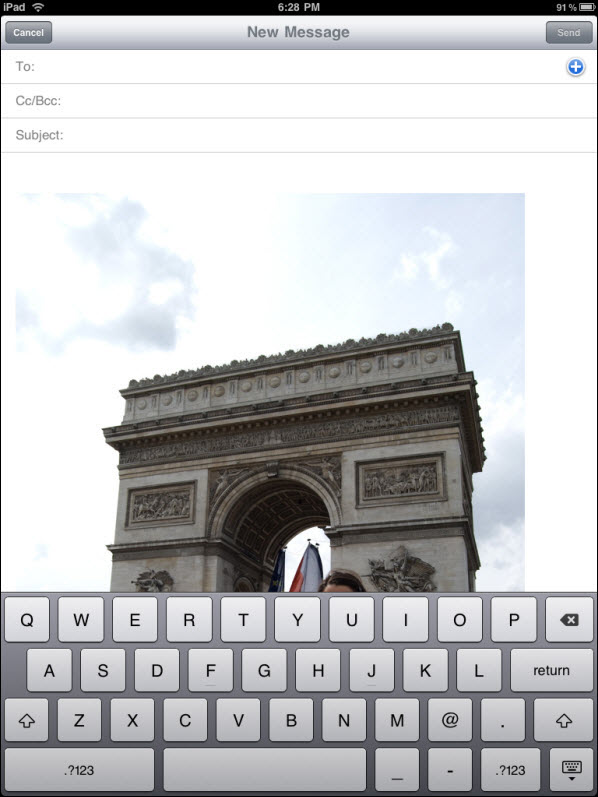
how to email pictures with your ipad 7 225x300 How to Send Pictures Via Email Using the iPad

All of your images are ready to send.

Are you looking for more iPad how-to’s, tips, and help? Visit our iPad page.

See More About: , , ,
Originally posted Apr 06, 2010

We close comments after 30 days on GilsMethod.com and ask that you post questions and issues on our Answers website.

This helps us better serve you by allowing us to keep track of unanswered questions that are usually hidden in long comment threads.

Answers.GilsMethod.com is a community-powered support website where you will be able to post questions, and other users including us will respond with expert advice.

So if you are having trouble with your PC, Mac, iPad, iPhone, or other piece of technology, head over to Answers.GilsMethod.com and ask away.

  • Maikee

    this does not work at all. please help!

  • http://profiles.google.com/photosia Shirley Drabble

    I cannot see an options button when following your instructions I have the original Ipad does it still work on that, I need to print some pictures from FLOWPAPER, the neatest app I own( I only have had my iPad one week)
    please can you help
    thanks

    • http://www.gilsmethod.com Gilberto J Perera

      Did you open an album on the iPad. If you are in the albums view you will
      not see the small arrow which allows you to send photos. Let me know.

  • JenniferhJackson

    Thank you so much, I didn’t think it was possible. Fab work

    • http://www.gilsmethod.com Gilberto J Perera

      You are welcome. Check out our iPad page for more guides. Http://www.gilsmethod.com/ipad

      Regards,

      Gilberto J Perera
      Editor-in-Chief, GilsMethod.com

  • Wdc202

    This works fine if you want your photos <> in the email messages. But how I can send the selected photos as <> that the receiver can store and then manipulate?

    • http://www.gilsmethod.com Gilberto J Perera

      The receiver will be able to store the message you send regardless of how it is sent. All they have to do is tap on the image and save to the iPad.

  • Pingback: Sending photos from iPad - iLounge Forums

  • Allieb

    I’ve learned from all your tutorials but the one thing I’m stuck on is deleting images. I’ve tried everything I can think of on iTunes and nothing makes sense. Is there a simple fix or a more detailed tutorial? You’ve made my iPad and entrance into Apple so much more enjoyable! Thanks!!

    • http://www.gilsmethod.com Gilberto J Perera

      Allieb,

      Thanks for the kind words, I’m glad my guides have been useful. Regarding
      your query, you mention deleting images from iTunes, but what exactly are
      you trying to do? Delete images from the iPad? Please clarify and I’ll be
      more than happy to take it up as a guide. Thanks.

      Like the GilsMethod.com Facebook page for a
      chance to win an iPod Touch and other prizes.

    • Maikee

      Hi! Please help! I can’t send the pictures at all. They keep going to my outbox as unsent!

    • http://www.gilsmethod.com Gilberto J Perera

      Do you have an email Acct set up? Which account type is it?

      Sent from my iPad

  • Stephwilliams71

    I have some photos on my ipad which were synced from my computer, I want to transfer some more photos from my computer to ipad and keep the existing ones, will this overwrite the existing photos on the ipad .

  • http://www.gilsmethod.com Gilberto J Perera

    That’s the limitation…

  • http://www.gilsmethod.com Gilberto J Perera

    Michele,

    Are the emails you are sending appearing in your Inbox or are they not being sent at all? Please let me know.

    • victoria8

      am a new Ipad owner. I have tried to email photos from my Ipad to my computer – just as you outlined but they do not go through! HELP! Instead they are not being sent at all… (sending failure)

    • http://www.gilsmethod.com Gilberto J Perera

      Victoria,

      Have you tried sending other messages without a picture to see if they can
      be sent? Could be an issue with your settings if the emails don’t send
      correctly.

  • Michelempr

    I am a new Ipad owner. I have tried to email photos from my Ipad to my computer – just as you outlined but they do not go through! HELP!
    michelemp@gmail.com