

See More About: , , , , , ,

Decrease Windows Boot Up Times by 20% in Less than 10 Minutes

by
image thumb Decrease Windows Boot Up Times by 20% in Less than 10 Minutes

Image Courtesy of Soluto.com

You might be thinking to yourself, “Impossible!” I am here to prove you wrong…about 6 of the 10 minutes will be spent restarting your computer…don’t believe me? Please read…Soluto is a free Windows application that, “…allows you to understand your boot, discover which applications are slowing it down […] and allows you to significantly improve it.” When you first install Soluto you will be asked to restart your computer so that the software can analyze your machine’s boot process. After the computer restarts you will be provided with a wealth of easy to understand information about your computer’s boot time and what affects it.

Note: I used Soluto with Windows 7 Ultimate Edition. Actual boot time improvements may vary.

If you are interested in improving Windows boot times you might also want to look at BootVis.
usesolutotospeedupboottimessummary thumb Decrease Windows Boot Up Times by 20% in Less than 10 Minutes

Soluto Boot Summary

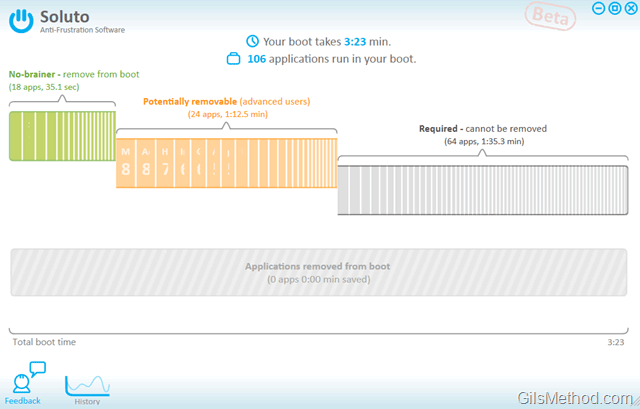
This summary can then be used to cull out the applications that are delaying your computer’s boot time. Three categories make it easy to determine which applications can be safely removed and which might need some advanced knowledge.

  • No-brainer – remove from boot.
  • Potentially removable (advanced users).
  • Required – Cannot be removed.

This report not only shows you which applications are slowing down your boot time, but it also gives you the option of disabling a specific application from booting up. The power of Soluto lies in the information gathered about what other users have done with a particular application (see below) and how.
usesolutotospeedupboottimessolutions thumb Decrease Windows Boot Up Times by 20% in Less than 10 Minutes

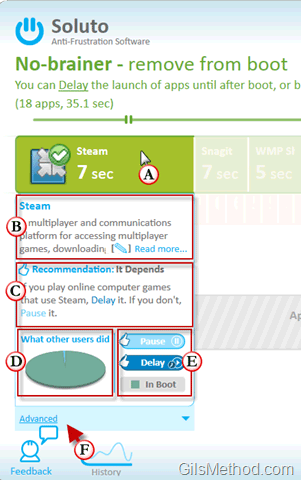
(A) In this example I placed my cursor over the No-brainer section and Soluto automatically shows me which applications are slowing down the computer’s boot time and for how long. Soluto also provides me with a clear and concise (B) summary about the application and then tells me what I should do with this application. In this case it tells me that it (C) Depends, this is because Steam is used to play video games, if I use Steam frequently I might want to leave it running, but if I don’t then I can (E) Pause or Delay when the application launches. Soluto also provides me with information about what (D) other users did with this application to help make a decision.

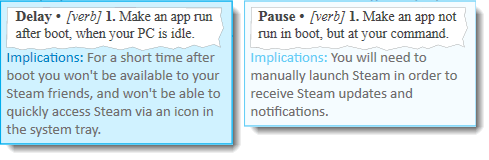
I know you’re probably wondering what Pause or Delay is, don’t worry, here are the definitions from the Soluto application:
pausedelaydefinitionsa thumb Decrease Windows Boot Up Times by 20% in Less than 10 Minutes

Delay – Make an app run after boot, when your PC is idle. Implications: Unique and based on the application and it’s functions.

Translation – A delayed app will run after your computer boots so that you can get to work right away.

Pause – Make an app not run in boot, but at your command. Implications: Unique and based on the application and it’s functions.

Translation – A paused app will not run until you run it manually.
usesolutotospeedupboottimesadvanced thumb Decrease Windows Boot Up Times by 20% in Less than 10 Minutes

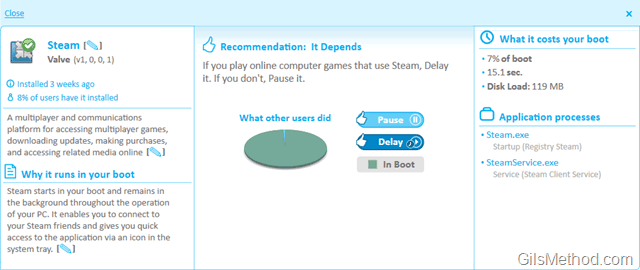
In the (F) Advanced screen above you are provided with more detailed information about the application in question along with some suggestions.
usesolutotospeedupboottimeshistory thumb Decrease Windows Boot Up Times by 20% in Less than 10 Minutes

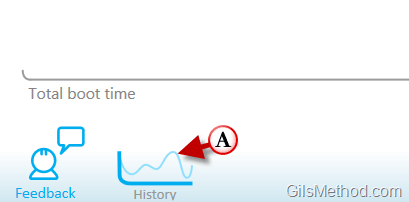
A. You can view your boot time performance history by clicking on History in the lower left corner of the window.
usesolutotospeedupboottimesremovedapplications thumb Decrease Windows Boot Up Times by 20% in Less than 10 Minutes

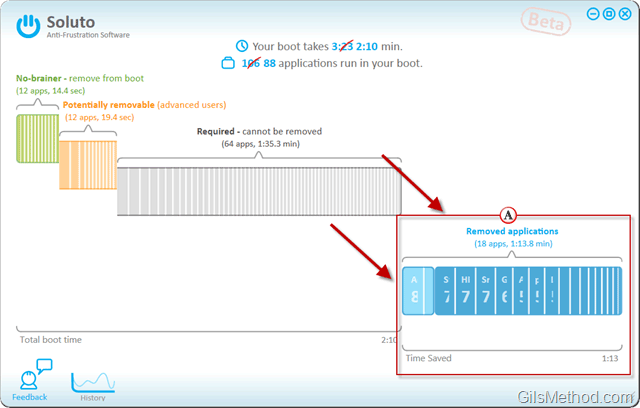
Once you’ve determined which apps you are going to Pause or Delay, Soluto will provide you with a summary of (A) Removed applications and the time savings associated with their removal.

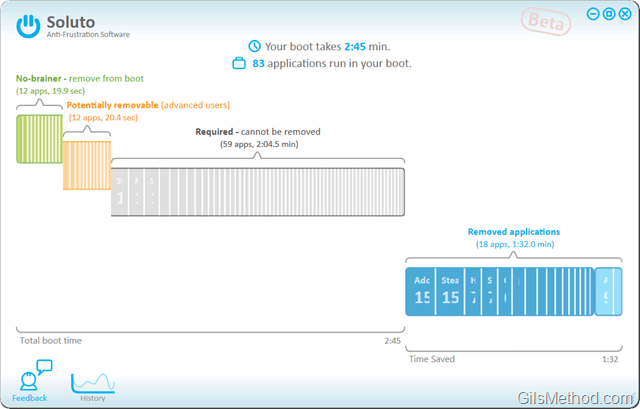
This is an estimate, let’s see if it really translates into faster boot times, so I rebooted my computer and…
usesolutotospeedupboottimesafterboot thumb Decrease Windows Boot Up Times by 20% in Less than 10 Minutes

I went from a 3 minute 23 second boot time to a 2 minute 45 second boot time, that’s an improvement of 18.7% or 38 seconds from my boot times…not bad. This improvement is based on just the No-brainer applications being disabled, imagine the speed improvements by tinkering with more apps.

So now that you know how the application works, download it from Soluto for free and speed up your boot times.

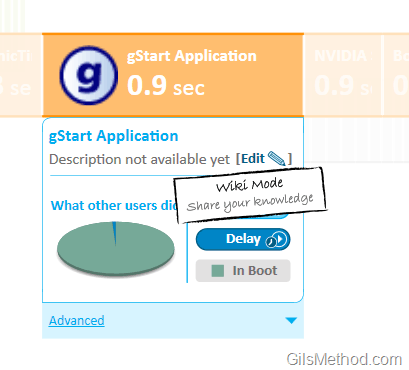
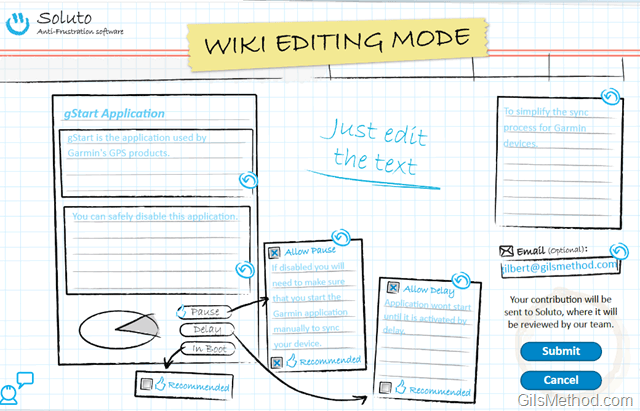
If you wish to contribute to the community, click on the Edit link (see below).
usesolutotospeedupboottimescontributea thumb Decrease Windows Boot Up Times by 20% in Less than 10 Minutes

The Wiki Mode will allow you to add information about a particular application. This information is then used to provide users with a wealth of information that will help them make better decisions about which applications to Pause or Delay.
usesolutotospeedupboottimescontribute thumb Decrease Windows Boot Up Times by 20% in Less than 10 Minutes

Wiki Editing Mode in Soluto.

Originally posted Jun 16, 2010

We close comments after 30 days on GilsMethod.com and ask that you post questions and issues on our Answers website.

This helps us better serve you by allowing us to keep track of unanswered questions that are usually hidden in long comment threads.

Answers.GilsMethod.com is a community-powered support website where you will be able to post questions, and other users including us will respond with expert advice.

So if you are having trouble with your PC, Mac, iPad, iPhone, or other piece of technology, head over to Answers.GilsMethod.com and ask away.

  • gami

    I installed it and its an awsome tool!
    BOOTVIS is for XP only and no one can understand what and how to shorten yor boot

  • http://www.gilsmethod.com Gilberto J Perera

    The title didn’t specify versions, that’s why I added BootVis for the XP crowd, but you’re right Bootvis is for XP only. Thanks for the feedback.

  • http://www.gilsmethod.com Gilberto J Perera

    The title didn’t specify versions, that’s why I added BootVis for the XP crowd, but you’re right Bootvis is for XP only. Thanks for the feedback.

  • http://www.gilsmethod.com Gilberto J Perera

    The title didn’t specify versions, that’s why I added BootVis for the XP crowd, but you’re right Bootvis is for XP only. Thanks for the feedback.

  • http://www.gilsmethod.com Gilberto J Perera

    The title didn’t specify versions, that’s why I added BootVis for the XP crowd, but you’re right Bootvis is for XP only. Thanks for the feedback.

  • http://topsy.com/www.gilsmethod.com/increase-windows-boot-times-20-10-minutes?utm_source=pingback&utm_campaign=L2 Tweets that mention Decrease Windows Boot Up Times by 20% in Less than 10 Minutes | GilsMethod.com — Topsy.com

    [...] This post was mentioned on Twitter by Gilberto J Perera, Gilberto J Perera. Gilberto J Perera said: Use @Soluto to speed up boot times in Windows – http://bit.ly/d2yghy [...]

  • sunil

    It doesn’t do much apart from removing unnecessary apps from the start up. we could do this manually as well, that would hardly take 1 min.

  • http://www.gilsmethod.com Gilberto J Perera

    Sunil,

    For someone that knows what they are doing like yourself you are absolutely right, but for most of the users out there who don’t know how to delve into the internals of Windows, this is a safe, informative, and easy way to speed up boot times. Thanks for the feedback.

  • http://www.gilsmethod.com Gilberto J Perera

    Sunil,

    For someone that knows what they are doing like yourself you are absolutely right, but for most of the users out there who don’t know how to delve into the internals of Windows, this is a safe, informative, and easy way to speed up boot times. Thanks for the feedback.

  • http://www.gilsmethod.com Gilberto J Perera

    Sunil,

    For someone that knows what they are doing like yourself you are absolutely right, but for most of the users out there who don’t know how to delve into the internals of Windows, this is a safe, informative, and easy way to speed up boot times. Thanks for the feedback.

  • http://www.gilsmethod.com Gilberto J Perera

    Sunil,

    For someone that knows what they are doing like yourself you are absolutely right, but for most of the users out there who don’t know how to delve into the internals of Windows, this is a safe, informative, and easy way to speed up boot times. Thanks for the feedback.

  • Joeson

    May i ask u a queston, thanks
    Windows XP saves logon/logoff/shutdown messages in %Windir%system32winlogon.exe. I can open it with eXescope and see these message in Resources→Stings→106, such as “Windows is booting”, “Windows is shutting down”.
    So in Windows 7, which file saves these message? I can’t them in winlogon in Windows 7.

  • http://www.gilsmethod.com Gilberto J Perera

    Joeson,

    What exactly are you trying to accomplish? I’m not sure where the information you are seeking is located, but you can try Microsoft Answers and ask some of the MVP’s there that may be familiar with the inner workings of Windows 7.

    http://answers.microsoft.com/en-us/windows/default.aspx#tab=2

  • http://www.gilsmethod.com Gilberto J Perera

    Joeson,

    What exactly are you trying to accomplish? I’m not sure where the information you are seeking is located, but you can try Microsoft Answers and ask some of the MVP’s there that may be familiar with the inner workings of Windows 7.

    http://answers.microsoft.com/en-us/windows/default.aspx#tab=2

  • http://www.gilsmethod.com Gilberto J Perera

    Joeson,

    What exactly are you trying to accomplish? I’m not sure where the information you are seeking is located, but you can try Microsoft Answers and ask some of the MVP’s there that may be familiar with the inner workings of Windows 7.

    http://answers.microsoft.com/en-us/windows/default.aspx#tab=2

