
See More About: , , ,

Office 2010 Is Alive and Kicking

by

office2010announcement Office 2010 Is Alive and Kicking

After months of offering Office 2010 as a free Beta download and after thousands of smileys and frowns (using Microsoft’s feedback system) Office 2010 is finally here. It hasn’t been since Office 2007, that Microsoft has drastically changed a product like they have in Office 2010 (with the exception of Windows 7 of course). The new version of Office 2010 boasts a ton of features that anyone running Office XP, Office 2003, and even Office 2007 would really consider upgrading. Office 2010 was released to corporations on May 12th and made it’s debut for consumers June 15th.

Office 2010 offers the following new and enhanced features:

The Backstage View

The File menu is back and it’s really cool.

office2010backstageview thumb Office 2010 Is Alive and Kicking

When you click on the File menu in any Office 2010 application you will be presented with the Backstage view. This view will provide you with information about your document, print options (including print view), recently accessed documents, and much more.

The goal of the Backstage view is to segregate the editing of a document from what you want to do with the document, the Backstage being what you want to do with a document once you have worked on it.

PowerPoint Video Editing

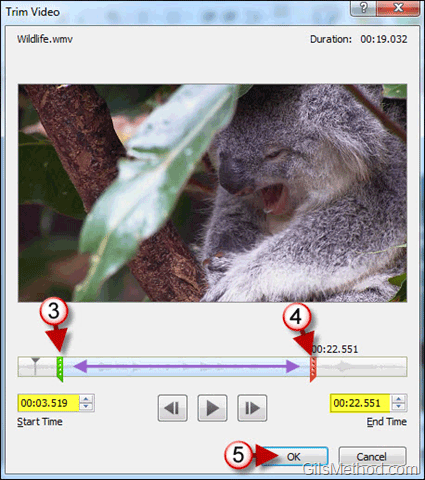
Now you can trim and add effects to videos in PowerPoint 2010.
office2010trimvideos thumb Office 2010 Is Alive and Kicking

In Trim Videos Within PowerPoint 2010 and Keep Your Audiences Focused I detail how you can edit videos within presentation slides in PowerPoint 2010.

Webcasts from PowerPoint

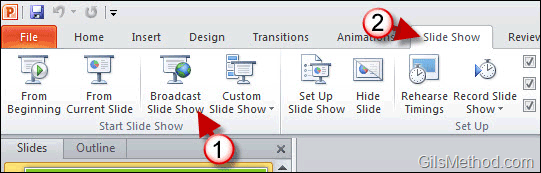
Why use Webex or GoToMeeting when PowerPoint 2010 offers a free webcasting tool?
office2010webcast thumb Office 2010 Is Alive and Kicking

Webcasts are broadcast using your Microsoft Live account and can be viewed by participants using a browser with Silverlight. Learn How to Create a Webcast with PowerPoint 2010.

Office Web Apps

Alongside the launch of Office 2010, Microsoft took Office Web Apps out of Beta and made it available to anyone with a Hotmail/Live account. Office Web Apps are a scaled down version of Word, PowerPoint, Excel, and OneNote that run in a browser window.

office2010officewebapps thumb Office 2010 Is Alive and Kicking

You can collaborate on documents with others, edit files using the browser, and save files directly from the desktop versions of these apps. To see the difference between these two editions, check out Office 2010 and Office Web Apps Compared.

PowerPivot 2010

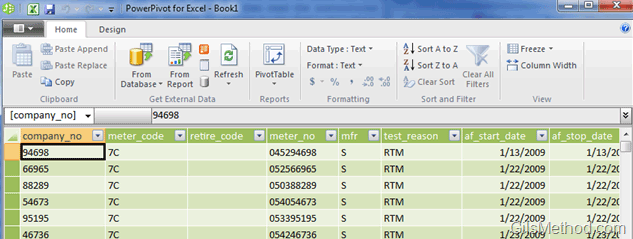
What if I told you that you can analyze and query millions of records in seconds? You’d think that I was running a multi-processor workstation with tons of RAM…I’m running these queries on a 5 year old laptop with PowerPivot. PowerPivot is a tool used in conjunction with Excel that allows you to view and manipulate data with speed and flexibility never imagined on a regular computer.
office2010powerpivot thumb Office 2010 Is Alive and Kicking

Learn How to Add a Database to PowerPivot for Excel so that you can start analyzing data without the wait.

You will find these and many more useful features in Office 2010. Pricing starts at $149.99 for Office Home and Student 2010 to $499.99 for Office Professional 2010.

What’s in the Box?
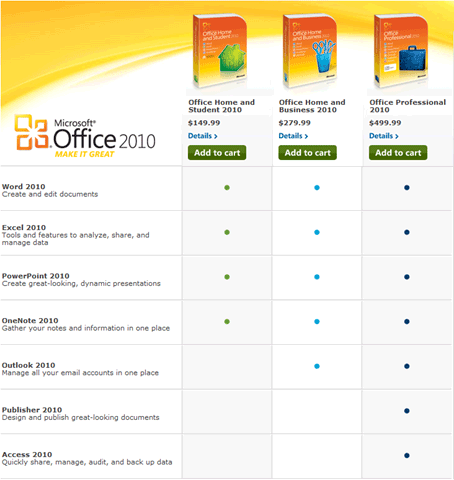
office2010inthebox thumb Office 2010 Is Alive and Kicking

Image from Microsoft Office Website

Office 2010 Help and How-to’s On GilsMethod.com

  • Help Fix Americas Debt Using Excel 2010 and PowerPivot

    If you haven’t been stuck under a rock for a while, then you should be well aware that America is in debt. Politicians have their own way of configuring numbers to help manage debt, of which many people don't agree upon. However, one author, Tyler Ch...

  • To The Cloud with Google and Microsoft

    Have you have been working on a document with your colleagues, either across the room or across the world, and have had the hassle of sending updated documents back and forth to each other? It’s quite a pain to do and you don’t always get the corre...

  • Create Sections in Word 2010 to Use Multiple Page Formats

    How many times have you wanted use a specific header for certain pages and another header for others? You have probably sat there fighting with Word until you came across this guide. The answer to your problem is simple, sections. In Word users can cre...

  • How to Change the Default Save Format in Excel, Word and PowerPoint 2010

    How many times have you received a reply from someone who cannot seem to open an attachment you sent them recently? If you’re using Office 2010 chances are that others have yet to upgrade to the latest version of Office, this means that you are ...

  • How to Add and Edit Hyperlinks in Word 2010

    Have you ever wanted to include a link to a website within a document you were working on? Did you know that you could include links to websites, parts of the document, new documents and even email addresses? In Word 2010 you have a lot of flexibility ...

  • How to Test Your Document's Readability in Word 2010

    If you have ever been interested in the readability level of your writing then you are going to love a hidden feature in Word 2010. Why would you care about the readability of your writing? Depending on your audience, the level at which you write needs...

  • How to Create and Edit Sparklines in Excel 2010

    If you’ve ever tried making sense of a lot of trend data in Excel you’ve usually found that plotting the data using a line chart or bar graph helps you make sense of it all. However what happens when you have more than one data set and al...

  • How to Customize Outlook 2010 Panes

    Does the default font size and style used throughout Outlook’s program interface bug you because it’s too small or the font isn’t your favorite? Have you ever wanted to change the font size used for Outlook's folders? If youâ€...

  • Save Time Formatting Cells in Excel with the Format Painter

    Applying a specific set of formatting settings to range of cells can be time consuming so imagine having to do the same for another sheet or workbook. Luckily in Excel 2010, the Office team included one of my favorites, the Format Painter tool. The For...

  • How to Save Attachments in Outlook 2010

    Attachments come in many file types and sizes, luckily the act of saving them to your computer for later use is quite simple. Due to the number of messages that I have received regarding this task, I’ve decided to create a short guide that will ...

  • Tip: Use Columns to Vertically Split Content in Word Documents

    Have you ever wanted to use a newspaper-like format for a document you were working with? If so, you’ll find that formatting content using multiple columns in Word is quite easy. The guide below will show you how to split the content in a Word d...

  • How to Disable AutoCorrect Features in Word 2010

    Although Word's AutoCorrect  feature makes us a bit careless with what we type, it does heck of a job to increase our productivity. It corrects typos, capitalizes words for us, and makes sure that we capitalize the correct words. It also does a great ...

  • Tip: Change AutoRecovery Frequency in Word 2010 to Avoid Disasters

    Have you ever worked on a monstrous paper only to have Word crash? Luckily the AutoRecover feature backed up the file and you are saved, but what about the work you got done in the past 10 minutes? If you haven’t changed the default value that W...

  • How to Edit Headers and Footers in Word 2010

    Are you new to Word 2010 or Word 2007 and don't know where the Header and Footer went? Don't worry, in this guide I will show you where on the Office Ribbon the Header & Footer options reside and I will also show you how to use some of the options ...

  • How to Transfer Word 2007 and Word 2010 Citations to Other Computers

    Are you a fan of Word’s reference tool? If you don’t know what I’m referring to then you are missing out on one of the easiest and quickest ways to generate citations that meet APA and MLA formatting standards. So back to those of ...

  • Feature: 3 Easy Steps To Declutter Your Inbox in Outlook 2010

    Don’t you hate it when you open your inbox every morning and find that you still have the same hundred messages you had yesterday plus 30 more? Don’t worry you are not the only one. Microsoft has done a pretty good job of ensuring that we...

  • Tip: Enable the Office Ribbon in OneNote 2010

    If you’re a fan of the Office Ribbon (like me) then you are most likely going to miss it in OneNote 2010. Although OneNote got the Ribbon in Office 2010, the default setting for the Ribbon is set to Minimize Ribbon. In this guide I will show you...

  • How to Change Margins in Word 2010

    If you are not familiar with Office 2007 and the Office Ribbon, chances are that you will probably feel lost in Word 2010. One of the things you will probably miss the most is the Page Setup in the File menu. Don’t worry, there’s an even ...

  • Office 2010 and Office Web Apps Compared

    Microsoft today debuts Office 2010 along with the much anticipated Office Web Apps. Office Web Apps is essentially an online version of Microsoft’s most popular products; Word, PowerPoint, Excel, and OneNote. The online versions of these pro...

  • Tip: Use the Office 2010 Screenshot Tool to Quickly Capture Your Screen

    Are you looking for a way to quickly insert screenshots from your computer into a Word document? In Word 2010 the Screenshot tool has been improved so that is more intuitive and easier to use. The guide below will show you how to use the Screenshot too...

  • Tip: Save Time by Creating a Blog Post Shortcut for Word 2010

    Last week I showed you how you can use Word 2007 and the soon to be released Word 2010 to create blog posts for your favorite blogging platforms. This week I will show you how to create a shortcut to the blog post template, so that you are ready to blo...

  • How to Send Text Messages with Outlook 2010

    Wouldn't it be nice to your next text message without having to leave your computer? In Outlook 2010 and 2007, users have the ability to setup an SMS account that allows you to send and receive text messages using Outlook's familiar email interface. Be...

  • How to Use the Formula Auditing Tools in Excel 2010

    How many times have you found cells with errors or the famous ##### entry? These can all be attributable to errors or improper formatting. In this tutorial we are going to focus on the error part. In Excel you have the ability to compose simple formula...

  • How to Add a Database to PowerPivot for Excel

    Are you new to PowerPivot for Excel? You’ve come to the right place. In this tutorial and in upcoming tutorials, I will be covering the basics of Excel's powerful new data analysis tool. In this guide I will show you how to add an Access databas...

  • How to Access the Calculator Without Leaving Excel 2010

    How often do you find yourself opening the Windows calculator to quickly find the solution to a problem? How often do you create a formula in Excel to find the answer to a silly calculation? If any of these apply, then you might want to add the Calcula...

  • Impress Your Boss with Amazing Cover Pages in Word 2010

    Are you looking for a quick and easy way to impress a client or your boss? Ditch the boring cover page. Word 2010 provides users with about 16 built-in cover page templates that can be used to spice up those boring cover pages. The cover page templates...

  • Tip: Add PST Files to Outlook 2010

    I recently quit my job and among the things I took with me was a copy of the Outlook archive file I created to save important messages. The archive file was saved as a .pst file which is commonly used by Outlook to save messages, calendar entries, to-d...

  • Office 2010 and SharePoint 2010 for Corporations is Here

    Today marks a milestone in the evolution of Microsoft’s Office Suite. Microsoft announced the release of Office 2010 and SharePoint 2010 to business customers worldwide. The new version of Office sports a new look, the capability to edit doc...

  • How to Create a Line Chart in Excel 2010

    If you are looking for a quick and easy way to display trend data for a period of time, like stock prices, the best chart to use is the line chart and its variants. Excel comes the option to chart data using various line charts that allow you to custom...

  • Change When Emails Are Considered Read in Outlook 2010

    How many times have you set an email to “Read” status when clicking on the message by mistake? I know I have and it can be extremely annoying, specially if you were not ready to review the message that was marked as “Read”. To k...

  • How to Add a Header and Footer to Excel 2010 Spreadsheets

    Want to make your Excel spreadsheets stand out? Use the header and footer. Like Word documents, Excel spreadsheets have the ability to use a header and a footer to display important information about the spreadsheet/chart you are working on. The header...

  • 3 Ways to Enter Formulas in Excel 2010

    Excel’s power lies in the vast array of formulas that allow you to calculate the sum of a given list all the way to determining the interest rate on a loan. But in order to use these powerful formulas you must become familiar with the several wa...

  • Download the Visio 2010 Viewer for Free

    Are you starting to receive Visio 2010 files from colleagues that you can’t seem to open? Chances are that you don’t have Visio installed or the viewer you are using does not support the latest version of Visio. Fortunately for you, Micro...

  • How to Change the Ruler's Unit of Measurement in Word 2010

    If you’re accustomed to using picas, points, centimeters, or millimeters while editing documents then this tutorial is for you. By default Word 2010 will display the ruler’s unit of measurement in inches, if you wish to change it to anoth...

  • How to Display the Ruler in Word 2010

    If you are upgrading from a Word version other than Word 2007, chances are you are wondering where the heck the ruler is. The default view in Word 2010 excludes the ruler as part of the Print Layout View while editing documents. I for one, like the inc...

  • How to Customize Your Work Hours in Outlook 2010

    If you use Outlook 2010 to manage your time, you have to make sure that you customize it to your work schedule. Outlook 2010 allows you to designate what your work schedule is (time and days), what day you consider to be the first day of the week, and ...

  • How to Determine the Size of Your Outlook 2010 Mailbox

    If you use Outlook 2010 in a corporate environment, chances are that you email storage quota will be exceeded with just a couple days of unread emails. To help you stay out of your IT department’s black list, you can keep track of how much space...

  • Office 2010 RTM Available on TechNet and MSDN Now

    It’s about time! I’ve been checking my MSDN and TechNet accounts for the Office 2010 RTM files to be posted all day…at around 6:30PM EST I noticed that the New Downloads section listed Office 2010 and Office Web Apps 2010 (screensho...

  • How-to Add Email Folders to Your Favorites in Outlook 2010

    Do you have more than 20 different folders in Outlook that you use to keep your emails organized? If this is the case you most likely use a couple of these folders more often than others. Rather than scrolling up and down each time you wish to look for...

  • How to Save Office 2010 Files Directly to SkyDrive

    Wouldn't you like to be able to access all of your Word Documents, Presentations, Spreadsheets, and even your Notes on the Go? Well, if you use Office 2010 and your Windows Live SkyDrive you'll have your files securely stored online so that you can acc...

  • How to Change the Color Scheme for Office 2010 Applications

    If you really want to differentiate yourself from others who use the default color scheme in Office 2010 applications, then read on. Office 2010 (beta) ships with three color schemes to help customize the look of all Office 2010 applications. To change...

  • How to Change the Default Email Format in Outlook 2010

    How many times have you started writing a new email message in Outlook and tried to insert a link and couldn't? Chances are that your default email format is Rich Text or Plain Text. In either case HTML code cannot be used when composing your message. ...

  • How to Modify the Default Outlook 2010 Start Folder

    If you use IMAP email accounts in Outlook you will soon find that all of your messages will be stored in a separate folder (see example below) and accessing the IMAP Inbox will require that you find and select the folder in order to view the emails wit...

  • How to Create a New Office File Using SkyDrive

    Pretty soon everyone with a SkyDrive account will be able to create and edit Excel spreadsheets, Word Documents, PowerPoint Presentations, and even their OneNote notes online. So...how exactly do you create these files using SkyDrive? Well, follow the ...

  • How to Quickly Add Contacts from Emails in Outlook 2010

    How many times have you gone back and forth between an email message and your contact list to add a new contact? Fortunately there's an easier way to add contacts from an email message. Outlook allows users to create new contacts from an open email mes...

  • Feature: The Complete Guide to Using Sections in PowerPoint 2010

    How many times have you worked on group presentation and found yourself lost? I know I have, specially when several team members are working on it and presenting together. In PowerPoint 2010 you can pretty much say goodbye to that problem. The Office t...

  • How to Create Subprocesses from a Selection in Visio 2010

    If you have ever worked on a Six Sigma project you know that the most important step is the documentation of the entire process in question. At times this can be a time consuming and if you're not careful can become a sort of controlled chaos of proces...

  • Buy Office 2007 Now and Upgrade to Office 2010 for Free!

    As Office 2010 draws closer to completion, Microsoft has assailed any fears for those purchasing Office 2007 before the official release of 2010 by announcing the Technology Guarantee Program. The program is designed to let customers who purchase quali...

See More About: , , ,
Originally posted Jun 16, 2010

We close comments after 30 days on GilsMethod.com and ask that you post questions and issues on our Answers website.

This helps us better serve you by allowing us to keep track of unanswered questions that are usually hidden in long comment threads.

Answers.GilsMethod.com is a community-powered support website where you will be able to post questions, and other users including us will respond with expert advice.

So if you are having trouble with your PC, Mac, iPad, iPhone, or other piece of technology, head over to Answers.GilsMethod.com and ask away.