
See More About: , , ,

Transfer Your Outlook 2003 Emails to Gmail

by
transfer email to google outlook 2003 header Transfer Your Outlook 2003 Emails to Gmail

In my previous article I detailed the steps necessary to transfer Outlook 2007 emails from your computer to your Gmail account. This how-to is a follow up to a comment left by one of my readers that pointed out that there were significant differences between Outlook 2007 and 2003. I decided to publish this article for him and for any of you who are using Outlook 2003 and would like to transfer your emails to Gmail. If you have any comments or questions, please post them below.

Note: I used Outlook 2003 and a standard Gmail account to write this article. If you use Google Apps you can use this free tool to transfer your emails.

To view the how-to describing the process for transferring appointments from Outlook to Google Calendar, follow this link.

Outlook 2007 users please follow the instructions on the article found on this link.

PLEASE NOTE Before proceeding make sure you enable IMAP in Gmail by following these instructions.
transfer email to google outlook 2003 Transfer Your Outlook 2003 Emails to Gmail

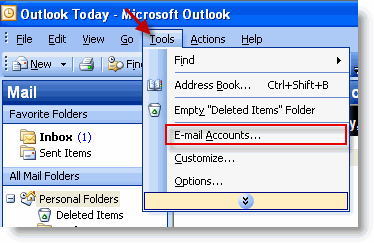
1. With Outlook open, click on Tools > E-mail Accounts
transfer email to google outlook 2003 1 Transfer Your Outlook 2003 Emails to Gmail

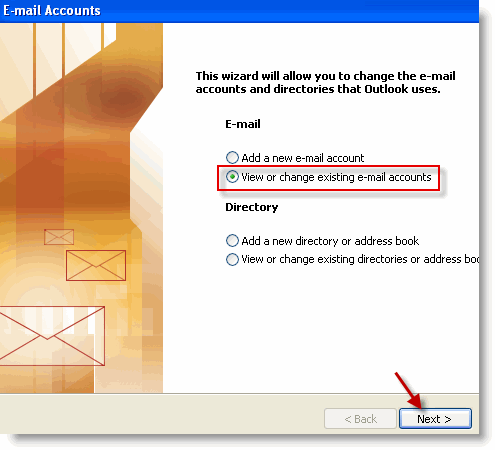
2. Select View or change existing e-mail accounts and click on Next to proceed.
transfer email to google outlook 2003 2 Transfer Your Outlook 2003 Emails to Gmail

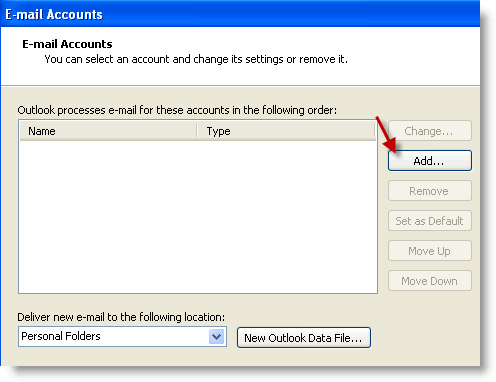
3. When the E-mail Account window opens, Click on the Add button to add your Gmail account to Outlook.


transfer email to google outlook 2003 3 Transfer Your Outlook 2003 Emails to Gmail

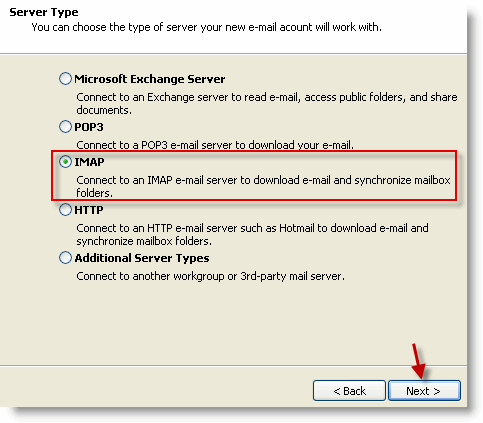
4. Select the third option, IMAP, click Next to proceed.
transfer email to google outlook 2003 4 Transfer Your Outlook 2003 Emails to Gmail

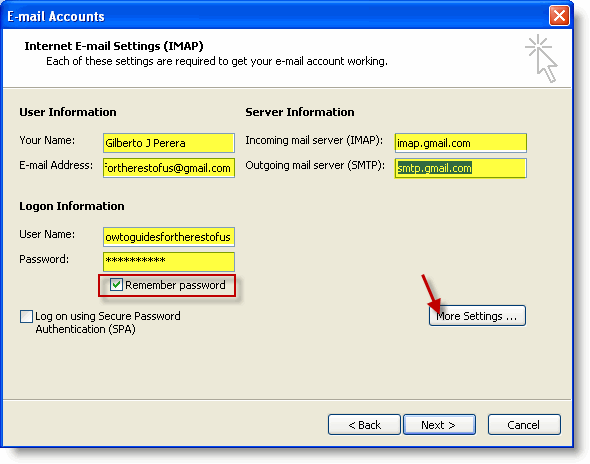
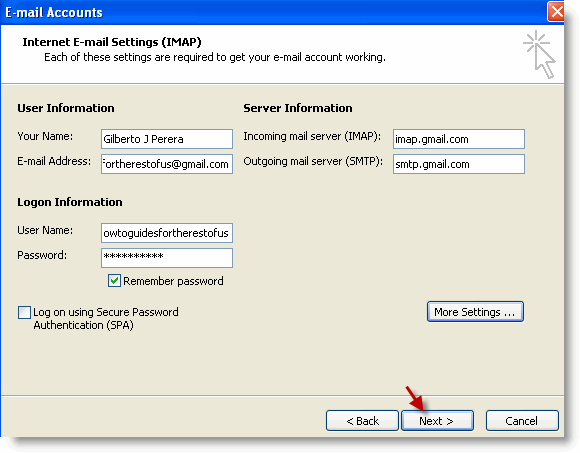
5. Fill out the form and make sure to select Remember password. Click on More Settings when form is complete.

Note: When filling out the form make sure that you use the following information;

  • Incoming mail server: imap.gmail.com
  • Outgoing mail server (SMTP): smtp.gmail.com
transfer email to google outlook 2003 5 Transfer Your Outlook 2003 Emails to Gmail

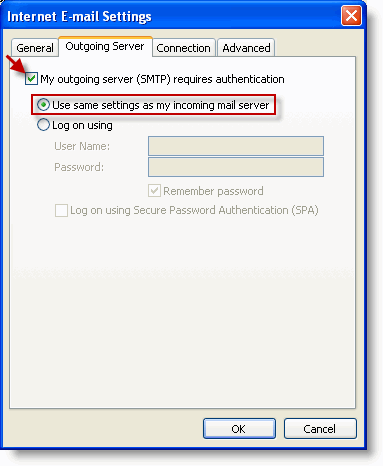
6. When the Internet E-mail Settings window opens, click on the Outgoing Server tab and add a check mark to My outgoing server (SMTP) requires authentication. Make sure that Use same settings… is selected.
transfer email to google outlook 2003 6 Transfer Your Outlook 2003 Emails to Gmail

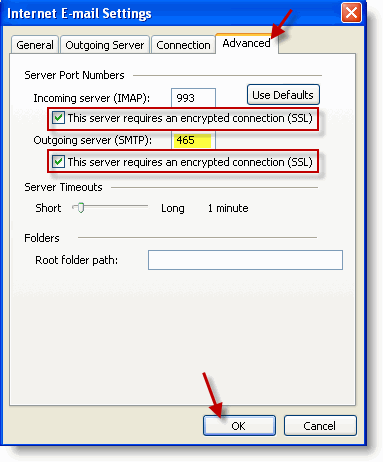
7. Click on the Advanced tab. Set the following port numbers and settings (below), click OK.

  • Incoming server (IMAP): 993 and add a check mark to This server requires an encrypted connection (SSL)
  • Outgoing server (SMTP): 465 and add a check mark to This server requires an encrypted connection (SSL)
transfer email to google outlook 2003 7 Transfer Your Outlook 2003 Emails to Gmail

8. Make sure all of the fields are filled and click Next to exit the wizard.
transfer email to google outlook 2003 8 Transfer Your Outlook 2003 Emails to Gmail

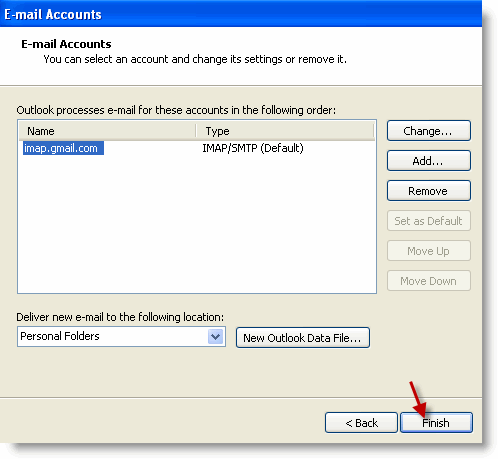
9. Click Finish to exit the E-mail Accounts window.
transfer email to google outlook 2003 9 Transfer Your Outlook 2003 Emails to Gmail

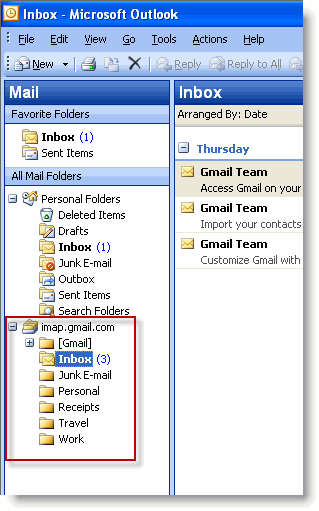
10. You should now be able to access your Gmail folders from within Outlook. Now you can start moving the emails from Outlook over to Gmail. Click on the folder containing emails from your Outlook file, select the emails within the folder (or the entire folder) and drag it over to the imap.gmail.com folder list. This will start the transfer of e-mails from your Outlook files to Gmail’s servers.

NOTE: I would urge you to copy and not just transfer your emails, this will ensure that you have a copy of your emails in your original .PST file.
transfer email to google12 Transfer Your Outlook 2003 Emails to Gmail

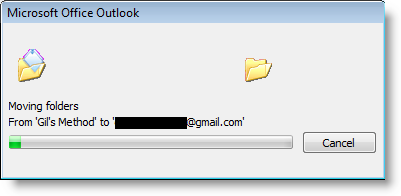
11. In some instances you may see the dialog box above. Depending on the size of your Outlook folders transfers could take seconds to hours.

Once the file transfers are completed you will have access to all of your e-mail from Outlook on Gmail.

Tips

  • Make sure your folder names do not use slashes (/) you will receive an error, there are other characters that I have not confirmed.
  • Unless you specify that your are copying the items over, the operation will move the files from your computer (the original.pst file) to Google’s servers and they will no longer be accessible from the ‘original’ .pst file. They will be accessible via Outlook but through the Gmail folder list.
  • It may seem that Outlook has locked up at times during the transfer, this is normal, it will happen if you have a lot of emails and/or large attachments, or your connection is slow.

See More About: , , ,
Originally posted Jul 26, 2009

We close comments after 30 days on GilsMethod.com and ask that you post questions and issues on our Answers website.

This helps us better serve you by allowing us to keep track of unanswered questions that are usually hidden in long comment threads.

Answers.GilsMethod.com is a community-powered support website where you will be able to post questions, and other users including us will respond with expert advice.

So if you are having trouble with your PC, Mac, iPad, iPhone, or other piece of technology, head over to Answers.GilsMethod.com and ask away.

  • Neal M Hoffman

    Dear Gil:
    Thank you, thank you. It worked. Of course, at first it didn’t because I stopped copying the instructions with 5 more pages to go. Then when I started at the point where I had stopped, and finished, it still didn’t work. Here’s a caution to all readers. Read carefully and type carefully what has been given to you as instruction, When I looked closely, I saw my error, did it over again, and have now succeeded in transferring about 600 messages (had many more but this gave me a chance to look them over and delete the unneeded). Now, since I have no further use for my verizon email account in Outlook, I’m going to delete it. The existence of that accound presents a danger to me, since I must have all my business mail come to me in another Outlook account. If I forget to send business email in the proper account, it could amount to penalties for me. Therefore, I have wanted to keep only the proper email account, since I’ve already had two problems. This way, personal mail to Gmail and businss mail to Outlook. Thanks so much.

    Neal

  • http://www.gilsmethod.com Gilberto J Perera

    @Neal – Have you looked at my other articles that explain how you can fetch emails from different accounts using Gmail and how now you can send messages using Gmail with your own domain? I included the links below for your convenience. I’m glad I was able to help.

  • http://www.gilsmethod.com Gilberto J Perera

    @Neal – Have you looked at my other articles that explain how you can fetch emails from different accounts using Gmail and how now you can send messages using Gmail with your own domain? I included the links below for your convenience. I’m glad I was able to help.

  • Joel

    I started this method, but it keeps timing out. I have a 4GB .pst file, and am not sure how to proceed. I have tried to transfer it folder by folder, but even then, it konks out after a few thousand messages. How should I proceed?

  • Joel

    I started this method, but it keeps timing out. I have a 4GB .pst file, and am not sure how to proceed. I have tried to transfer it folder by folder, but even then, it konks out after a few thousand messages. How should I proceed?

  • http://www.gilsmethod.com Gilberto J Perera

    @Joel: It sounds to me like you are going to have to do smaller batches. I had a 700MB file and had to break it down because I encountered the same problem. Luckily I was able to do it with folders…sounds like you have a ton of messages. The good thing is that once you get it done you should not have this issue again. Let me know if you are successful batching.

    What connection speed do you have?

  • http://www.gilsmethod.com Gilberto J Perera

    @Joel: It sounds to me like you are going to have to do smaller batches. I had a 700MB file and had to break it down because I encountered the same problem. Luckily I was able to do it with folders…sounds like you have a ton of messages. The good thing is that once you get it done you should not have this issue again. Let me know if you are successful batching.

    What connection speed do you have?

  • bryan smith

    I just want to transfer folders from my 2003 Outlook to my gmail account then continue using both accounts as before. Will using your above process still allow me to do this.

  • bryan smith

    I just want to transfer folders from my 2003 Outlook to my gmail account then continue using both accounts as before. Will using your above process still allow me to do this.

  • http://intensedebate.com/people/gjperera gjperera

    Yes, as long as you use IMAP. This is what I currently use for Outlook 2010 and it works like a charm. You just need to open Outlook every once a in a while to update the folders from Gmail to Outlook. Let me know if this makes sense.

  • http://intensedebate.com/people/gjperera gjperera

    Yes, as long as you use IMAP. This is what I currently use for Outlook 2010 and it works like a charm. You just need to open Outlook every once a in a while to update the folders from Gmail to Outlook. Let me know if this makes sense.

  • Sam

    Very helpful, thanks for taking the time to write it up.

  • Isaac

    Thanks for the post. I used it but when I tried to transfer the files, I get a pop-up asking me to enter my user name and password. It’s strange since I had it saved in step 7. Any idea how i can get past it and transfer my files over?

  • Valerie

    Hi
    Thank you for your articles, I think I understand things.
    I am trying to switch to IMAP, I have a domain and associated e-mail and a Gmail account set up for me by someone else. I use Outlook 2003.
    Everything downloads to outlook at the moment very little remains on Gmail and I dont know how to stop this. Even if I sign into Gmail direct, some e-mails I have sent and received do not show up anywhere other than Outlook.
    Will the above work for me even though I have in effect managed to enable IMAP on Gmail and configure outlook accordingly? I just used Gmails own instructions. I know this isn’t a big deal to some but I am not techie and a complete novice.
    I want to be able to access my e-mails from any where and ideally have them synched between my PC and Laptop. I have thunderbird on my laptop.configured to Gmail.
    I am reaching the conclusion it may be better – easier – just to use Gmail and no e-mail client. In any event I still need to get my old e-mails to Gmail and stop Outlook from downloading the e-mails locally.
    Following Gmails instructions for configuration of Outlook, in my folders there is no Gmail folder, can I change the e-mail account I have or would I be better to start from scratch?
    I am nervous and haven’t removed the old POP account, so whilst I am successfully receiving and sending emails I do continually receive a dialogue box requesting I enter a Network Password and send/receive shows errors for POP. I realise this is because outlook in part thinkjs POP is still enableg but Gmail is only set up for IMAP.
    Also I am not using exchange does that make a difference?
    Many thanks
    Valerie

  • http://www.gilsmethod.com Gilberto J Perera

    Did you try entering your credentials? What error did you receive if it didn’t work? Thanks.

    Regards,

    Gilberto J Perera
    Editor-in-Chief, GilsMethod.com

  • http://www.gilsmethod.com Gilberto J Perera

    When you use imap, both sides will remain synced. Sounds like you have a setting that removes messages when they are downloaded. I would try adding a separate account in outlook ad imap and then try to download the messages. Keep the old account just in case. Let me know if you have any questions.

    Regards,

    Gilberto J Perera
    Editor-in-Chief, GilsMethod.com
